Archive for July 2009

Friday, July 31, 2009

Web Based FTP Client


Web Based FTP ClientNet2FTP is a web-based FTP client which has all the features one could ask in a full stand-alone application. You can either use it directly at http://www.net2ftp.com or install it on your own web server.

With Net2FTP, you can:

* Install software on your server (requires PHP).
* Copy, move or delete files and directories.
* Edit text and HTML files online.
* Filter files using filename, size and modification time.
* Upload/download files in a zip format, and unzip files on the server.
* Copy files from one FTP server to another FTP server.
* Rename, Chmod and tons of administrative features.

Net2FTP even supports skins!

You can use Net2FTP on a computer that doesn't have any FTP client installed or on your own machine, just for the fact that a FTP client can't get lighter than this (it's just a webpage afterall...).

[via techie-buzz.com]

View Comments
Friday, July 31, 2009

Adobe Released A New Alpha Version Of Flash Player 10 for Linux x86_64 (64 bit)


Yesterday, Adobe released an alpha version of Flash Player plug-in version 10 for x86_64 architecture. This is a prerelease version of the Adobe® Flash® Player 10 software 64-bit Linux platforms. It is being made available for developers and consumers to test their content to ensure new features function as expected, existing content plays back correctly, and there are no compatibility issues.

The Flash Player 10 prerelease is available in all supported languages; however, the prerelease installers are only in English and we can only accept feedback in English at this time.

Important: All users should uninstall any currently installed Flash Player before installing the latest prerelease.

Download it from here

View Comments
Friday, July 31, 2009

Get the Feel of Dreamweaver in a Firefox Extension


codetech firefox extension

Codetech is a Firefox addon that lets you edit your documents right next to your web pages as you surf. For a web developer or designer, which offten deals with HTML source code, Codetch is a lite version of a application like Adobe Dreamweaver. It has a similar layout, yet less features, but it helps the user to complete its source based tasks.
Author description says it all. It’s the closest you can get to a professional web editing interface in a browser.

View Comments
Thursday, July 30, 2009

Integrate Google Calendar Into Your Gnome Calendar [Linux]


To integrate Google Calendar events into your Gnome desktop, go to Google Calendar, click on "Settings", then on the "Calendars" tab and then on your calendar's name:

google calendar

Then, at the bottom there is a section called "Private Address:" > click on the "ICAL" green icon to get your private calendar URL, like in the picture below:

google calendar private links

Now all you have to do is open a terminal and paste this:
/usr/lib/evolution-webcal/evolution-webcal URL
replacing URL with your ICAL private URL you got in the step above.

A window will pop up and here is where you can make the update frequency settings (I set mine to update every 30 minutes).

This is how your Google Calendar tasks, appointments, etc will show up in Gnome Calendar:

gnome google calendar


Please note: evolution-webcal may be in different folders in different distros. (For example in SuSe, it’s in /opt/gnome/lib/evolution-webcal/evolution-webcal). If the above code doesn’t work for you, you can locate evolution-webcal using:
find / -name evolution-webcal


[via paraisolinux]

View Comments
Thursday, July 30, 2009

Latest Google Chrome Dev Build Officially Adds Theme Support


Themes have been gradually getting simpler to activate in Google Chrome, but they became enabled by default in the newest developer releases this week, version 3.0.195.3 and a hasty bug-fix release Wednesday night, version 3.0.195.4. No longer must you mess with pesky "--enable-extensions" command-line switches or other nitty-gritty options.

google chrome theme

When you point Chrome to a theme's URL, the browser will offer to save it, a process that installs it, too.

chrome theme

If you're using the new Chrome developer release, there are two sample themes available, Camo and Snowflake. To activate them, click the link then agree to save the CRX file. Chrome will then switch themes and give you a yellow alert it did so.

Google is working on making this easier. In the tools menu, clicking "Options" and then "Personal Stuff," there's a "Themes" section with a "Get Themes" button. So far the Web site it links to is empty, but presumably it will be populated with some themes soon enough.

The themes also work on Mac OS X, though the options dialog box has a tantalizing color picker that I couldn't get to do anything.

The new version also adds support for the HTML 5 video tag, Google said. That feature is a centerpiece of browser makers' efforts to propagate "open Web" standards that permit richer Web sites and Web applications that don't rely on plug-ins such as Adobe Flash.

(Credit: Screenshot by Stephen Shankland/CNET)

View Comments
Thursday, July 30, 2009

Automatic Post Summaries for Blogger, With Image Thumbnails


We talked about a way of implementing selective excerpt ("Read More") for Blogger blogs (or expandable post summaries) and today I am going to present you another way of doing it, but this time by using image thumbnails (which can be turned off if you like).

This Blogger hack has 3 advantages:

1. You can set it to automatically cut off a post after a certain number or words or manually do this.
2. You can chose if you want to display a thumbnail image or not.
3. It is the first blogspot.com hack which allows you to use the <!-- more --> tag just like Wordpress.

Let's proceed to implementing the code. There are only a few simple steps you need to follow:

1. Log in to your Blogger Dashboard and go to Layout > Edit HTML and check the "Expand Widget Templates" box.

2. Search for the following piece of code in your template: <data:post.body/> and replace it with:
<b:if cond='data:blog.pageType != "item"'>
<div expr:id='"summary" + data:post.id' style='display:none;'><data:post.body/></div>
<script type='text/javascript'>createSummaryAndThumb("summary&lt;data:post.id/&gt;");</script>
<div style="clear:both" align='right' class='rmlink'><a expr:href='data:post.url'>-->Read More</a></div>
</b:if>
<b:if cond='data:blog.pageType == "item"'><data:post.body/></b:if>
If Blogger displays an error when saving the template, this code instead of the above.

In this code, edit the "Read More" text with something else if you want to.

3. Search for the <body> tag in your Blogger template and paste the following code above it:
<script type='text/javascript'>
var thumbnail_mode = 'no-float' ; 
var classicMode = false ;
var summary_noimg = 60;
var summary_img = 50;
var img_thumb_height = 150;
var img_thumb_width = 220;
var indent = 3;
</script>

<script type="text/javascript">
//&lt;![CDATA[
/******************************************
Auto-readmore link script, version 4.0 (for blogspot)

(C)2009 by Anhvo

Homepage:  http://vietwebguide.com

Please dont remove this copyright or change it into your own
******************************************************/

/*******************************************
CONFIG (extenal code)
-------------------------------

var thumbnail_mode = "float" ; //(or "no-float")
var classicMode = false ;
var summary_noimg = 60;
var summary_img = 50;
var img_thumb_height = 100;
var img_thumb_width = 120;
var indent = 3;

*********************************************/

function stripHtmlTags(s,max){return s.replace(/&lt;.*?&gt;/ig, '').split(/\s+/).slice(0,max-1).join(' ')}

function getSummaryLikeWP(id) {
return document.getElementById(id).innerHTML.split(/&lt;!--\s*more\s*--&gt;/)[0];
}

function getSummaryImproved(post,max){
var re = /&lt;.*?&gt;/gi
var re2 = /&lt;br.*?&gt;/gi
var re3 = /(&lt;\/{1}p&gt;)|(&lt;\/{1}div&gt;)/gi
var re4 = /(&lt;style.*?\/{1}style&gt;)|(&lt;script.*?\/{1}script&gt;)|(&lt;table.*?\/{1}table&gt;)|(&lt;form.*?\/{1}form&gt;)|()|()/gi

post = post.replace(re4,'')
post = post.replace(re3,'&lt;br /&gt; ').split(re2)

for(var i=0; i&lt;post.length; i++){
post[i] = post[i].replace(re,'');
}
var post2 = new Array();
for(var i in post) {
//if(post[i]!='' &amp;&amp; post[i]!=' ' &amp;&amp; post[i] != '\n') post2.push(post[i]);
if(/[a-zA-Z0-9]/.test(post[i])) post2.push(post[i]) ;

}


var s = "";
var indentBlank = "";
for(var i=0;i&lt;indent;i++){
indentBlank += " ";
}
if(post2.join('&lt;br/&gt;').split(' ').length &lt; max-1 ){
s = post2.join(indentBlank +' &lt;br/&gt;');
} else {
var i = 0;
while(s.split(' ').length &lt; max){
s += indentBlank + ' ' + post2[i]+'&lt;br/&gt;';
i++;
}
}
return s;
}


function createSummaryAndThumb(pID){
var div = document.getElementById(pID);
var content = div.innerHTML;
if (/&lt;!--\s*more\s*--&gt;/.test(content)) {
div.innerHTML = getSummaryLikeWP(pID);
div.style.display = "block";
}
else {

var imgtag = "";
var img = div.getElementsByTagName("img");
var summ = summary_noimg;
if(img.length&gt;=1) {
if(thumbnail_mode == "float") {
imgtag = '&lt;span style="float:left; padding:0px 10px 5px 0px;"&gt;&lt;img src="'+img[0].src+'" width="'+img_thumb_width+'px" height="'+img_thumb_height+'px"/&gt;&lt;/span&gt;';
summ = summary_img;
} else {
imgtag = '&lt;div style="padding:5px" align="center"&gt;&lt;img style="max-width:'+img_thumb_width+'px; max-height:'+img_thumb_height+'px;" src="'+img[0].src+'" /&gt;&lt;/div&gt;';
summ = summary_img;
}
}

var summary = (classicMode) ? imgtag + '&lt;div&gt;' + stripHtmlTags(content,summ) + '&lt;/div&gt;' : imgtag + '&lt;div&gt;' + getSummaryImproved(content,summ) + '&lt;/div&gt;';

div.innerHTML = summary;
div.style.display = "block";
}
}
//]]&gt;
</script>

Again, if you receive an error when saving your changes, use the code from here instead of the one above.

4. Configuring the code above:


In the script above you see some variables (bolded):
var thumbnail_mode= 'no-float';
var classicMode = false;
var summary_noimg = 60;
var summary_img = 50;
var img_thumb_height = 150;
var img_thumb_width = 220;

The thumbnail_mode variable determines whatever or not you want the image to be displayed to the left or the text. If you choose 'no-float', the image will not be displayed and if you choose 'float', the image thumbnail will be displayed on the left side of your posts when on the homepage (not post page).

classicMode sets if the posts should be cut off at the same point or not. It is advisable to change it to 'true' if you selected the 'float' mode for "thumbnail_mode"

summary_noimg and summary_img values are the number of words of the excerpts when your posts have or don't have an image attached. For instance, a value of '50' means "50 words".

img_thumb_height and img_thumb_width - the height and width the image thumbnails should have.

The really new thing with this script is that it works just like Wordpress does which means that you can use the <-- more --> tag to manually enter the post cut off point. Example:

The excerpt. This part of the post will be displayed on the home page. <!-- more --> The rest of the post. This part of the post will only be displayed once the user click on the "Read More" link or the post title.

Altough this script is better than the one I mentioned before (using selective posts cut off), it still has one disadvantage: setting it to automatically cut off posts, all of your posts will have an "Read More" link, even if they are shorter than the number of words you set it to cut the posts in your blog.

Don't forget to visit our list of Blogger (blogspot.com) hacks and gadgets.

[Credits: ChicaBlogger]

View Comments
Thursday, July 30, 2009

InfraRecorder: Free, Open-Source CD / DVD Burning Application [Windows Only]


InfraRecorderIf you are tired of applications such as Nero Burning ROM which come bundled with lots of other applications which you really don't need, have a huge size and are not free, you should give InfraRecorder a try.

InfraRecorder is lightweight (just 3.19 MB) CD / DVD burner software for Windows which does everything it's supposed to, for free.

InfraRecorder features

* Create custom data, audio and mixed-mode projects and record them to physical discs as well as disc images.
* Supports recording to dual-layer DVDs.
* Blank (erase) rewritable discs using four different methods.
* Record disc images (ISO and BIN/CUE).
* Fixate discs (write lead-out information to prevent further data from being added to the disc).
* Scan the SCSI/IDE bus for devices and collect information about their capabilities.
* Create disc copies, on the fly and using a temporary disc image.
* Import session data from multi-session discs and add more sessions to them.
* Display disc information.
* Save audio and data tracks to files (.wav, .wma, .ogg, .mp3 and .iso).

For newbies, it also comes with a step-by-step guide on how to burn CDs and DVDs, burn an ISO, create an image, copy an audio CD or reformat a disk. You can find this guide, HERE.

Download InfraRecorder

Thanks Tinhed for the tip!


Update: well this is weird, Nero just released a stripped down version (comes with just basic CD / DVD burning features, for everything else, you'll need to upgrade) of it's Burning ROM which is freeware. You can download if from HERE.

View Comments
Thursday, July 30, 2009

T-Messenger: Instant Messaging Using Twitter


t-messenger

T-Messenger is a Twitter client which runs on Adobe Air (works on: Windows, Linux and MacOSX) that not only looks like a instant messaging client but it also has some IM features: it allows you to create groups of users, send a picture using drag-n-drop, automatic url shortening via bit.ly and also if you exceed the 140-character limit it will make multiple tweets allowing you to post whatever you want without having to worry about making your message smaller.

T-Messenger is light-speed fast, ultra-responsive and has a very low memory footprint.

Update: T-Messenger only works in Linux if you install the latest version of Adobe Air!


[via bitelia]

View Comments
Thursday, July 30, 2009

Mozilla Weave Sync 0.5 Released


Weave Sync lets you securely take your Firefox experience with you to all your Firefox browsers — including our mobile browser, codenamed Fennec. It currently supports continuous synchronization of your bookmarks, browsing history, saved passwords and tabs.

Improvements in Weave 0.5:

* Major performance improvements during upload and download
* Sync waits until you’re not actively using the browser - no more occasional performance hiccups
* Improved support for bookmark tags and smart folders
* Support for changing passwords and passphrases
* Support for Fennec on Windows Mobile and Firefox on x86 OpenSolaris
* Better error handling and reporting

Install Weave 0.5 (for Firefox 3.5+)

View Comments
Thursday, July 30, 2009

5 Beautiful, Recently Updated Ubuntu Themes


1. New Wave

new wave gnome theme

Besides the GTK theme, New Wave also comes with:
- GUI New Wave Configurator,
- Emerald themes,
- Compiz-fusion settings,
- Second theme with dark menus,
- Firefox skin,
- Some metacity tweaks.
- Opera theme

Download New Wave | More info

2. Raysys QDark

Raysys QDark

Comes with GTK, Metacity and Emerald themes.

Download Raysys QDark

3. Black Rain

black rain ubuntu theme

Download Black Rain

4. BlackFuzz-Ubuntu Edition

BlackFuzz-Ubuntu Edition

It comes with GTK, Metacity and Emerald Themes + optional: icons.

Download BlackFuzz-Ubuntu Edition

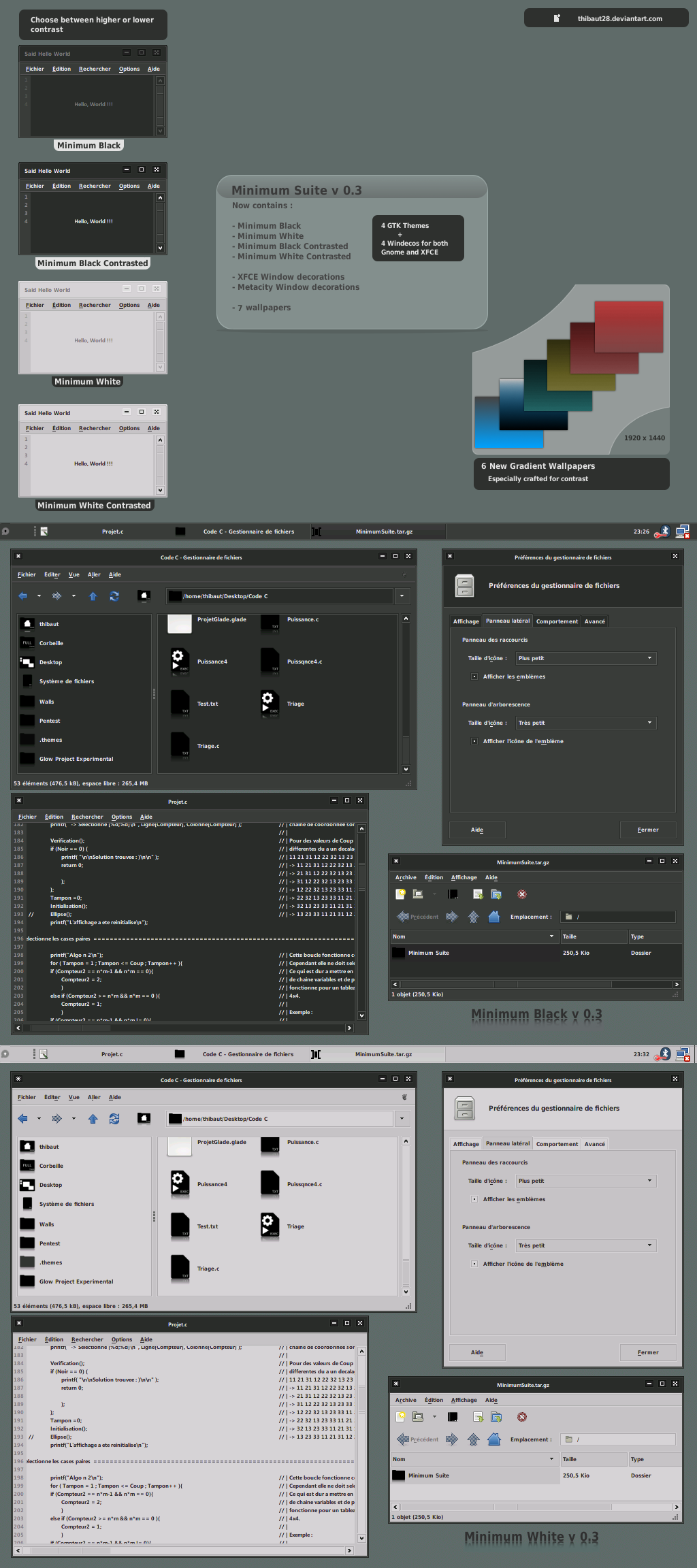
5. Minimum Suite v 0.3


The archive contains :

- Minimum Black GTK Theme
- Minimum White GTK Theme
- Minimum Black Contrasted GTK Theme
- Minimum White Contrasted GTK Theme

- XFCE Black Windeco
- XFCE White Windeco
- XFCE Black Contrasted Windeco
- XFCE White Contrasted Windeco

- Metacity Black Windeco
- Metacity White Windeco
- Metacity Black Contrasted Windeco
- Metacity White Contrasted Windeco

- Gradient wallpapers

Download Minimum Suite v 0.3

And a bonus

Ultimate Theme Pack:

Ultimate Theme Pack Ubuntu
(the screenshot consists of just one out of the many themes that come with Ultimate Theme Pack)

O/S's Supported: Hardy+ x86 & x64 UE 1.8+ (Debian untested)
Version: 0.0.4
Architecture supported: x64 / x86
File size: 399.7 MB (419,097,724 bytes)

Comes with:
[*] 3 Ultimate Edition usplashes (18 - 32 bit autodetects architecture)
[*] 34 Wallpapers
[*] 14 GDM logins
[*] 27 Icon sets
[*] 102 GTK / Metacity themes
[*] 49 Emerald themes
[*] 5 Cursor sets
[*] 2 Sound schemes

The pack comes in a Ubuntu .deb package.

Download Ultimate Theme Pack

View Comments
Thursday, July 30, 2009

Download Gimp Animation Package 2.6.0 (GAP) .deb File for Ubuntu


gimp antimation packageRemember Gimp Animation Package? GIMP Animation Package is a collection of Plug-Ins to extend the GIMP with capabilities to edit and create Animations as sequences of single frames. GAP version 2.6.0 was released a while back and at the time, you needed to compile the package to be able to use it but now there are Ubuntu .deb packages available which you can use for a one-click install of Gimp Animation Package:

Download GAP for Ubuntu Jaunty 32 bits
Download GAP for Ubuntu Jaunty 64 bits

View Comments
Thursday, July 30, 2009

Preview All The Fonts Installed On Your Computer Without Installing Any Software [Free]


myfontbookHaving a big variety of fonts installed on your system is both a blessing and a curse: at some point you lost count on how many fonts you have installed and most importantly: which fonts. The best solution is having an application which displays a preview of your installed fonts so you'll know which one to use and when. For this you can use myFontbook which is a web application (so you don't have to install anything on your computer) that shows you a preview of all your fonts in an organized panel.

It find all your fonts in seconds and displays them in a small preview while at the bottom you can see the entire character set, chose a custom text to see how it would look like, special characters and some more options. Another thing for which myFontbook is great is that it helps you organize and catalog your fonts. One thing that really interests me is if it works or not on Linux but unfortunately I am currently at a computer which only has Windows installed but I'll update this post tonight when I'll be able to test myFontbook on my Linux machine.

Update: Yes, myFontbook works on Linux too, thanks Ariel!


myFontbook is a free and requires no registration, but if you want to save your preferences, you will have to register for an account.

[via Punto Geek]

View Comments
Thursday, July 30, 2009

Desktop Google Reader Application for Windows


Desktop Google Reader

Google Reader is probably the most popular RSS agregator service but it lacks an official desktop client but for that you can use Desktop Google Reader (unofficial client) who's major feature is Outlook-like notifications for new items arriving for any of your feeds. For now, it's features are very basic (like viewing/deleting & starring functionality) but it will hopefully grow into something more functional.

Download Desktop Google Reader | via BlogsDNA

View Comments
Wednesday, July 29, 2009

A New Debian Version Every Two Years


debianWhere most time-based distributions have a schedule of round and about six months, Debian takes another approach, obviously because Debian is more about stability and longevity than about the latest and greatest features in each release. As such, the project adopted a two-year release schedule, with a development freeze every December of odd-numbered years, with the actual release following in the first half of the following year.

Time-based freezes will allow the Debian Project to blend the predictability of time based releases with its well established policy of feature based releases. The new freeze policy will provide better predictability of releases for users of the Debian distribution, and also allow Debian developers to do better long-term planning. A two-year release cycle will give more time for disruptive changes, reducing inconveniences caused for users. Having predictable freezes should also reduce overall freeze time.


The first of this new type of freeze will happen December 2009, making the time between the current release and the next one rather short - this is a one-time occurrence. "To accommodate the needs of larger organisations and other users with a long upgrade process, the announcement reads, "the Debian project commits to provide the possibility to skip the upcoming release and do a skip-upgrade straight from Debian GNU/Linux 5.0 (Lenny) to Debian GNU/Linux 7.0 (not yet codenamed)."

[via osnews]

View Comments
Wednesday, July 29, 2009

Freeware System Information Software for Windows: SIW


siw

SIW (System Information for Windows) is a tool that displays details regarding everything on your computer: hardware, operating system, etc... Kind of like Lavalys Everest if you like, but freeware. By the way, if you want a free license for Everest 4.6, read here. We already talked about 2 such system info applications but for Linux while SIW runs on Windows (see all supported Windows versions at the bottom of the post).

The system information is divided into few major categories:
  • Software Inventory: Operating System, Installed Software and Hotfixes, Processes, Services, Users, Open Files, System Uptime, Installed Codecs, Software Licenses (Product Keys / Serial Numbers / CD Key), Secrets (Password Recovery).
  • Hardware Inventory: Motherboard, Sensors, BIOS, CPU, chipset, PCI/AGP, USB and ISA/PnP Devices, Memory, Video Card, Monitor, Disk Drives, CD/DVD Devices, SCSI Devices, S.M.A.R.T., Ports, Printers.
  • Network Information: Network Cards, Network Shares, currently active Network Connections, Open Ports.
  • Network Tools: MAC Address Changer, Neighborhood Scan, Ping, Trace, Statistics
  • Miscellaneous Tools: Eureka! (Reveal lost passwords hidden behind asterisks), Monitor Test, Shutdown / Restart.
  • Real-time monitors: CPU, Memory, Page File usage and Network Traffic.

SIW is portable and freeware and runs on: Microsoft Windows 98 / Me / NT4 / 2000 / XP / Server 2003 / Media Center / Tablet PC / Windows 2003 Server R2 / Vista / Windows Server 2008 / Windows 7 / Windows Server 2008 R2 / WinRE / Bart PE / Winternals ERD Commander

Download SIW | via PPLWare

View Comments
Wednesday, July 29, 2009

Download Avidemux 2.5.0: (For: Ubuntu - .deb Files, Windows)


Avidemux is a free video editor designed for simple cutting, filtering and encoding tasks. It supports many file types, including AVI, DVD compatible MPEG files, MP4 and ASF, using a variety of codecs. Tasks can be automated using projects, job queue and powerful scripting capabilities.Avidemux is available for Linux, BSD, Mac OS X and Microsoft Windows.

What's new in Avidemux 2.5.0:
* Audio Codecs, Audio Devices and Video Filters are now plugins
* x264 and Xvid encoders are now also plugins with an updated Qt interface
* Auto wizards are now scripted and easier to extend
* Updated the FFmpeg libraries
* Various minor fixes and enhancements

You can find the complete changelog, here (current build: r5152).

Download Avidemux 2.5.0:


Windows
Other Windows Downloads:

Most versions and svn builds Hosted by Gruntster

Most versions and svn builds Hosted by Lord Mulder


Ubuntu Linux:
Debian - read the instructions here.

For other operating systems / Linux distributions, see here.

View Comments
Wednesday, July 29, 2009

How To Upgrade From Windows 7 Beta or RC to Windows 7 RTM


If you have installed Windows 7 Release Candidate or Windows 7 Beta (or any other pre-releases for that matter) then you cannot directly upgrade to Windows 7 RTM (current build: 7600.16385). Well actually you can, but after applying a trick. When trying to upgrade to Windows 7 build 7600.16385, the setup will give you an error message saying: You cannot upgrade this prerelease version of Windows 7. Go online to see how to install Windows 7 and keep your files and settings:

You cannot upgrade this prerelease version of Windows 7. Go online to see how to install Windows 7 and keep your files and settings

That's because Windows 7 RTM was build to block all versions prior to 7233. But you can bypass this by following the simple steps below:

1. Extract the contents of Windows 7 RTM ISO Image to any folder or USB Disk using WinRAR.
2. Open the sources folder, and then using notepad, open "cversion.ini" file.
3. Modify the "MinClient" build number to a value lower than the down-level build. For example, change 7233 to 7000.
Original content of cversion.ini:
[HostBuild]
MinClient=7233.0
MinServer=7100.0
How the file should look like after you have modified it:
[HostBuild]
MinClient=7000.0
MinServer=7100.0
4. Save the updated file to the same location and then run setup.exe to start Windows 7 RC upgrade process.
5. On the Installation type screen, choose whether you want to upgrade your current Windows 7 Beta or RC:

upgrade windows 7

View Comments
Wednesday, July 29, 2009

Speed Up Flash and Firefox in Ubuntu Jaunty [Tips & Tricks]


1.

Type the following command in a terminal:
sudo gedit /etc/init.d/ondemand
and paste this inside that file:
for CPU_THRESHOLD in /sys/devices/system/cpu/cpu*/cpufreq/ondemand/up_threshold
do
[ -f $CPU_THRESHOLD ] || continue
echo -n 40 > $CPU_THRESHOLD
done

The file basically needs to look like this:
case "$1" in
start)
start-stop-daemon --start --background --exec /etc/init.d/ondemand -- background
;;
background)
sleep 60 # probably enough time for desktop login

for CPUFREQ in /sys/devices/system/cpu/cpu*/cpufreq/scaling_governor
do
[ -f $CPUFREQ ] || continue
echo -n ondemand > $CPUFREQ
done

for CPU_THRESHOLD in /sys/devices/system/cpu/cpu*/cpufreq/ondemand/up_threshold
do
[ -f $CPU_THRESHOLD ] || continue
echo -n 40 > $CPU_THRESHOLD
done
;;
restart|reload|force-reload)
echo "Error: argument '$1' not supported" >&2
exit 3
;;
stop)
;;
*)
echo "Usage: $0 start|stop" >&2
exit 3
;;
esac

More info about this, HERE.

2.

Open a terminal and paste this:
sudo mkdir /etc/adobe
echo "OverrideGPUValidation=true" >~/mms.cfg
sudo mv ~/mms.cfg /etc/adobe/

More info, HERE.

Thanks phyx for these 2 tips & tricks.

View Comments
Wednesday, July 29, 2009

The New Twitter Homepage Is Now Live


Twitter just announced its new home page redesign complete with trending topics and search.

Now:

picture-316

Before:

54257v1

Comparing the old homepage to the new homepage sheds an enormous amount of light on Twitter’s ambitions with its microblogging platform. Here’s the old description text:

“Twitter is a service for friends, family, and co-workers to communicate and stay connected through the exchange of quick, frequent answers to one simple question: What are you doing?

And here’s the new text:

“Share and discover what’s happening right now, anywhere in the world”

You immediately notice the deemphasis on your personal network – the people you live, sleep, and work with – and the focus on realtime discovery and world events. Twitter’s stepped away from being branded as a social network, or being compared to Facebook.

The second big change is search – specifically the trending topics. The company not only makes sure you realize that the Twitterverse is talking about things you care about (whether it’s pitcher Mark Buehrle or Blue M&Ms), but it explains them with a conversation bubble that appears when you hover over the question mark icon.

And here’s Twitter’s post on the new homepage. Here’s the key blurb:

The open and timely exchange of information will have a positive impact on the world and Twitter has a role to play. We have a lot of work to do when it comes to the quality of our search results and trend analysis but repositioning the product to focus more on discovery is an important first step in presenting Twitter to a wider audience of folks around the world who are eager to start engaging with new people, ideas, opinions, events, and sources of information.

We’ll likely continue to make changes to the Twitter home page as we respond to feedback and ideas. We’re eager to see if encouraging a sense of wonder and discovery leads to a better first impression of Twitter.

An interesting thing: It also looks like Twitter is using this new homepage search interface to highlight some of the lesser-used search operators, like the “:)” symbol for results with “positive attitude.”

picture-108

picture-1114

View Comments
Wednesday, July 29, 2009

Free Partition Manager Which Supports 32 / 64 bit Windows 2000, XP, Vista and 7


Partition Wizard Home Edition

Partition Wizard Home Edition is a free partition manager which supports 32/64 bit Windows Operating System including Windows 2000, XP, Vista and Windows 7. Home users can perform complicated partition operations by using this powerful but free partition manager to manage their hard disk partition such as Resizing partitions, Copying partitions, Create partition, Delete partition, Format partition, Convert partition, Explore partition, Hide partition, Change drive letter, Set active partition and Partition Recovery.

Main Features
  • Support Windows 2000/XP/Vista/Windows7 (32 bit & 64 bit) operating system.
  • Support RAID.
  • Extend system partition to improve computer performance to maximum.
  • Manage the hard disk to get the best performance of computer.
  • Create , Delete and Format partitions with simple steps.
  • Disk Copy to protect or transfer data.
  • Support disk and partition size larger than 2 TB.
  • Convert partition format from FAT to NTFS.
  • Partition Copy: Copy the entire hard disk to another one.
  • Copy Disk Wizard: Copy the entire hard disk to another one without windows reinstalling.
  • Disk Map - Visually demonstrate your disk/partition configuration; preview the changes before applying.
  • Hide/unhide partition, set active partition, etc. - Change partition properties.
  • Explore FAT/NTFS partition.


Partition Wizard Home Edition is designated for home user only, to use Partition Wizard in a business envirnoment, Partition Wizard Business Edition is required.

View Comments
Wednesday, July 29, 2009

24 Amazing Windows Vista Themes / Styles


SteelFlash

SteelFlash_Final_100k_by_Steel89

Windows Se7en for Vista

Windows_Se7en_for_Vista_FINAL

Aero Diamond

Aero_Diamond_Final_by_R0UNDER

Aero Blue

Aero_Blue_by_IiTz_ShAnE

Aurorarion Darkside vR2

Aurorarion_Darkside_vR2_by_XPmania

Clearlooks for Vista

Clearlooks_for_Vista_by_omganinja

Clearscreen Sharp for Vista

Clearscreen_Sharp_for_Vista_by_K_Johnson

Erubescence

Erubescence_by_jasonito

LIM Leopard

LIM_Leopard

Lumen VS

Lumen_VS____by_sweatyfish

LumenS for Vista

LumenS_for_vista_by_vekanoid

Maxclear

Maxclear_V3_1_theme_for_Vista_by_sonicexcess

Media Center Theme

Media_Center_Theme

PerpetualV2

PerpetualV2_by_universe11

AeroVG Theme for Windows Vista

AeroVG_Theme_for_Windows_Vista

ProjectX 2

ProjectX_2____by_sweatyfish

Snow Leopard

Snow_Leopard_by_mufflerexoz

UltimateDark

UltimateDark_by_r3c1pr0c17y

Vagia's G Revolution

Vagia__s_G_Revolution

VUbuntu for Vista

VUbuntu_for_Vista_beta_2_by_in_dolly

Windows 8 Professional Edition

Windows_8_Professional_Edition_by_mufflerexoz

Wood

Wood_by_dimage

Indigo for Windows Vista

Indigo_for_Windows_Vista_by_ShamusHand

Illuminatis VisualStyle

Illuminatis_VisualStyle_RC_by_RajTheeban95


How to Install Themes / Styles in Windows Vista

Note: Please follow the instructions given on the theme author’s page. Some themes include additional resources like dock application, styler bars, sidebar skins and such, necessary to achieve the complete transformation. General instructions on how to apply Windows Vista visual style is provided at the end of the article.

General instructions:

  1. Download either NiwradSoft UxTheme Patcher or VistaGlazz and run the application to patch the uxtheme.dll file of Windows Vista.
  2. Download the ZIP file containing the theme from the author’s page and unzip the contents.
  3. Open the directory C:\Windows\Resources\Themes and copy the extracted folder here. (The copied folder should contain the theme file and the Shell folder.)
  4. Now right click on the desktop and click Personalize.
  5. Click on the tab Appearance. Under the item Color Schemes you will find all the themes you copied to the “Theme” directory.
  6. Select one to apply.
CREDITS FOR THIS ARTICLE: InstantFundas.com

View Comments