Ubuntu / Linux news and application reviews.

ffDiaporama 1.6 Released (Tool To Create Movie Clips From Photos and Videos)

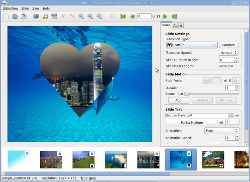
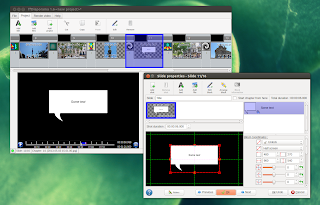
ffDiaporama is an application written in Qt, available for Linux and Windows, that allows you mix videos, music, text and photos to create movie clips / slideshows. The application supports adding animations such as zoom, rotation or Ken Burns Effect, add titles (text), annotations and more.

ffDiaporama

Create A Wallpaper Slideshow With XML Background Creator For GNOME 3

nautilus script xml background creator


"XML Animated Background Creator" is a Nautilus script to easily generate XML wallpaper slideshows (wallpapers that change automatically) for GNOME 3.

There used to be many such applications for GNOME 2, but they can't change the background anymore because they still use GConf, while the background settings are now stored in DConf. And since XML Animated Background Creator is easy to use and install on any Linux distribution, I've upgraded it to work with GNOME 3 (it works with any "shell": Unity, GNOME Shell, fallback session).

Make A Video From Pictures And Music Using ffDiaporama

ffdiaporama ubuntu

ffDiaporama is a multi-platform application for creating videos from photos or movie clips. It supports various transition effects, titles/annotations, music and more.

The application has been created by one of the Videoporama developers (by the way, the Videoporama development has stopped), but unlike Videoporama, ffDiaporama is written in C++ instead of Python.

Videoporama 0.8.1 Released, Now Better Than Ever! [Application To Create Video From Pictures]

Videoporama 0.8.1

Videoporama is an application you can use to create video presentations from pictures that runs on Linux and Windows. It comes with various transition effects, option to add sound to the video, many different presets and uses mplayer for previewing the slideshow before processing it. We've covered Videoporama in detail a while back so check out that post for more info: Videoporama: Create Cool Video Slideshows From Your Pictures.


Videoporama 0.8.1 was released a few days ago, adding a cool new feature that's not available in any other such Linux applications: you can now include videos too so it's not just an application to create videos from pictures anymore. You can also set the start / end position for a movie so if you only want to display a few seconds from a video in your montage, you can easily do it from the Videoporama options.

Ubuntu 10.04 Proposed Ubiquity Slideshow Goes Live

ubuntu 10.04 lucid slideshow


The Ubuntu Ubiquity Slideshow is a project which uses Webkit that provides a slideshow when you install Ubuntu.


The new Ubuntu 10.04 Lucid Lynx Ubiquity Slideshow which we were telling you about ~2 weeks ago is now live and you should be able to take a look for yourself by downloading an Ubuntu 10.04 daily build starting tomorrow (or by updating the installer but that didn't work for me - the package is probably not in the repositories yet).

Besides the improved look, there are some other changes too: the Ubuntu slideshow is now 816x500 pixels in size (it used to be 700x420), the slideshow now uses the official Firefox icon rather than a generic browser icon, as well as some other minor improvements.


Here are a few more screenshots:

Simple DVD Slide Show Maker for Linux: Imagination

Imagination is a lightweight and simple DVD slide show maker for Linux.


Imagination is incredibly simple to use. Just start it up, then click the top-left button to create a new slide show. A new dialog box pops up, asking you for a name (and location to save) your new slideshow, along with the format and a couple other options. You have the choice to save your slideshow as either a VOB (Video Object), for direct burning to DVD, or as a Flash Video, for uploading to video sharing websites such as YouTube). And you're covered whether you live in Europe or the US, as Imagination supports both PAL and NTSC video formats, as well as 4:3 or widescreen.

Once you've created your slideshow, you'll want to add images to it. Simply click the picture icon in the toolbar and select one, or as many images as you like. Once in your timeline, images can be reordered by drag and drop. There are three options you have per slide - transition type, transition speed and slide duration.

The transition type is how Imagination shows the change between slides, and you have options such as cross fade, push in, wave, and more. Transition speed is controllable by selecting from fast, normal or slow. And slide duration is the amount of time your image will be shown on screen, not including time spent transitioning from the previous slide or transitioning to the next.

The latest beta release of Imagination is 2.0b1 released on 22/08/09 featuring Ken Burns effects allowing infinite number of stop points, text on the slides along with some text animations, ability to cut/copy/paste the slides and other improvements.


Download Imagination

Ubuntu users can install Imagination from the official Ubuntu repositories:
sudo apt-get install imagination

If you use another Linux distro, you must compile the packages from HERE.

Ubiquity (Ubuntu Installer) Is Getting A Slideshow

Ubiquity (the Ubuntu live CD's installer) is getting a slideshow that will play during the installation. The slideshow is written in HTML and CSS. The README file for the code indicates that slides should be 700x420 in order to fit on displays of 800x600. Since the PlaySlideshow.sh file only contains "xdg-open URL," I can assume the slideshow will appear in the default browser for the system being installed.

Here is a video of the slideshow (obviously, the slideshow is still in developments):


Source & video credits: I BEEN TO UBUNTU