Author: Andrew
| Date: June 01, 2009
|
| Tags:
cross-platform,
linux,
presentations,
software,
tutorial,
windows,
wink
Wink is a Tutorial and Presentation creation software, primarily aimed at creating tutorials on how to use software (like a tutor for MS-Word/Excel etc) and the best part is that is freeware and runs on both Windows and Linux.
Using Wink you can capture screenshots, add explanations boxes, buttons, titles etc and generate a highly effective tutorial for your users.
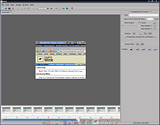
Features:
* Audio: Record voice as you create the tutorial for explaining better.
* Input formats: Capture screenshots from your PC, or use images in BMP/JPG/PNG/TIFF/GIF formats.
* Output formats: Macromedia Flash, Standalone EXE, PDF, PostScript, HTML or any of the above image formats. Use Flash/html for the web, EXE for distributing to PC users and PDF for printable manuals.
* Multilingual support: Works in English, French, German, Italian, Danish, Spanish, Serbian, Japanese, Brazilian Portuguese and Simplified/Traditional Chinese.
* Smart Capture Tools: Capture screenshots automatically as you use your PC, based on mouse and keyboard input (great time saver and generates professional captures).
* Performance/Quality: Creates highly compressed Flash presentations (few kbs to few hundreds of kbs, much smaller than competing commercial products) ideal for using on the web.
* Tools:
o Navigation buttons to move to next/previous/random frames in the presentation, you can use custom bitmaps for these buttons (full transparency/alpha channel support).
o Callouts and shapes for displaying text explanations. The inbuilt Callout Editor is used to create custom shaped callouts as you want.
o Intuitive drag-n-drop editing of the frame, callout, cursor, navigation buttons and the title elements.
o Advanced features like templates, cursor editing, palettes, background images, control bars & preloaders for the flash output etc.
o Completely PC and Web ready with exports to PDF, HTML, SWF and EXE formats.
o Innovative compression techniques applied to reduce filesize of output Flash file. Generated flash file plays in Flash players from version 3 and above, giving you widest array of target audience.
o Uncompressed output to allow you import the output of Wink into other Flash editors.
Download Wink.
Ubuntu x86 users just have to:
sudo apt-get install wink
For Ubuntu x86_64 users I found an old tutorial on how to install Wink which might still work.
Read about it here.


