Ubuntu / Linux news and application reviews.

Partially Fixing Disqus Comments To Not Get Penalized By Google

This post is for those of you which have a blog and run Disqus comment system on it.

Firstly, let me tell you the exact story: I haven't noticed this before, but if you look at the source code of a post (post, not main page) of probably all blogs using Disqus (except Web Upd8 and Mashable), and search for some words in the post, you will see them displayed twice: once in the actual post and once in a div with the "disqus_post_message" id, which is not visible on the actual page because it's hidden. This basically means all your posts text exists twice on your blog which is of course not very good in terms of SEO. Even worse, the "disqus_post_message" has the style "display:none", which Google interprets as trying to hide content.

Disqus Comment System Gets Updated to V3

disqus v3

Disqus V3 is being rolled out today and promises to be the biggest change to the product since its inception in 2007.

With the ability to sign on with existing social networking accounts like Facebook or Twitter, Disqus offers lots of advantages to both users and publishers. Users benefit because they get a platform that lets them keep the same identity across multiple sites and easily comment without having to create yet-another account. Publishers benefit because they don’t have to worry about running comment registrations themselves, plus they get to easily integrate other social networks directly into their blogs.


The new Disqus Comments improved automated tools for dealing with spam or abusive comments. There is a restricted word filter that will trigger moderator approval on comments and you can whitelist or blacklist a certain e-mail or username.

A new addition I really like is the new Narcissus theme (no need for a screenshot, we already switched to this theme, here, on Web Upd8, take a look below).

Disqus Comments can import IntenseDebate and JS-Kit comments and export comments back out too. Additionally, the Moveable Type and WordPress (WordPress) plugins have been updated and allow for full comment synching.

Registered users will have their comments number displayed next to their username - another addition I really like:

disqus v3 comment number

Now if I could only see the total number of comments for my blog...

Again, Disqus Profile isn’t another profile, but a management tool for commenters to better keep track of and control their comments, subscriptions and various profiles. You can search through the comments you have left on other sites and edit or delete them without having to go back to a specific site or blog entry. You can also easily add-in your various social profiles from Facebook, Tumblr, Twitter and OpenID and choose to syndicate your comments to some or all of those services.

You can also merge your profiles together. This is great for those of us who often forget that we sign-up or login with something and then end up with multiple accounts for the same thing.

The best addition in my view is that now, after you post a comment, the page won't need to reload. This can easily be set for any blog. For Blogger Blogs it may seem tricky because it requests you enter a url to a blank.html page or to /does-not-exist/ hosted on your domain. But this can easily be done by entering http://YOURBLOG.blogspot.com/blank.html (or any other URL which redirects to a 404 page) in the corresponding form field (Disqus Dashboard > Settings > General at the bottom of the page). You can test this feature by commenting to this post ;)

And the last new addition I noticed: Disqus now supports FeedFlare for FeedBurner, meaning it can display the number of comments from your blog, right on your feed. To enable this, login to your Feedburner account, go to Optimize > FeedFlare, enable it and in the "Add new flare" field, enter http://YOUR_BLOG_DISQUS_NAME.disqus.com/~feedflare/comments_link.xml , obviously replacing YOUR_BLOG_DISQUS_NAME with your blog name on Disqus (Example: http://webupd8.disqus.com/~feedflare/comments_link.xml)

Please note there could be other changes / improvements too, but Disqus hasn't publish any info just yet.

[via mashable.com]

Disqus Adds Akismet Support

disqus akismet

Disqus comment system (which we use here, at WebUpd8) just decided it's time to stop the spam, and until they make their own anti-spam system:

We’re seeing an increase in a couple different types of spam lately. Sometimes it’s your straightforward, anonymous spammers. We can catch that easily. Recently, Disqus users have been victims to blackhat spammers who spend some time to leave legitimate comments, only to sign off with a suspicious link hawking designer sunglasses. We’ve gone through a handful of different spam handlers. We’re not entirely happy with what we have going on right now.

And last week, our spam handling went down for a short while which created a large backlog of unprocessed spam comments. This didn’t help things at all.

But, there is a solution. We’ve been working on our own Disqus anti-spam that we will be launching soon. It’s too early to report on its total effectiveness, but tests are looking very good.


they integrated Akismet, the most used anti-spam blog plug-in.

To enable Akismet for your Disqus-powerd blog comments, go to Disqus dashboard > Settings > check the "Akismet" option, and also enter your Akismet API (you need a wordpress.com account to receive an API, don't worry, it's free).

Disqus Comment System Adds Subscription via Email

web upd8

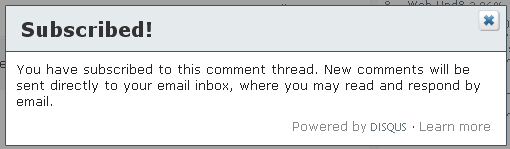
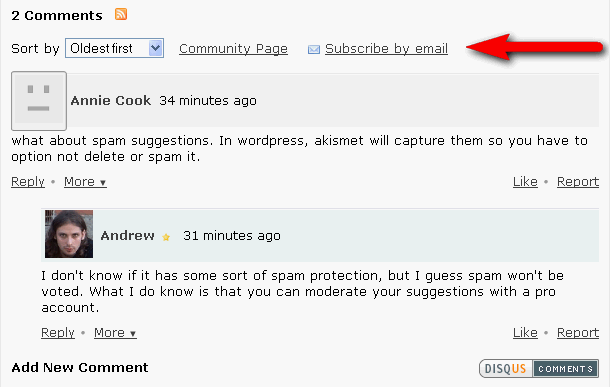
Disqus, one of the best comment systems, added the one thing it was missing: subscribing to comments via email. That means that when you post a comment on a blog powered by Disqus (such as Web Upd8), you have the option to subscribe to that comment thread and you will receive an email whenever someone replies to that post.

The "Subscribe by email" option appears in 2 places: once, at the top of the comments thread and under your name and email form, when you comment.

We started using Disqus primarily for it's speed compared to it's alternatives, but in the mean time, it has truly become great, one of it's best features being the social media comments which we love here at Web Upd8.

Disqus Comments Now With Twitter Sign-In

photobucketDisqus are continuing to innovate, and today they’re rolling out a new feature on all Disqus blogs, including Web Upd8: the ability to Sign In with Twitter and cross-post your comment to your Twitter stream.

Disqus already has the ability to cross post to Twitter if you have a Disqus account already. And if you comment on multiple blogs, that still might be the best way to set it up. But if you just want to quickly leave a comment on Web Upd8 and have it shown to all your Twitter followers, Disqus makes that super easy with a big “Sign In with Twitter” button.

Go ahead and try it: if you’re not logged into Disqus, click the big “Sign In with Twitter” button and leave a comment on this post. It’ll appear in your Twitter stream right away.

Disqus Social Media Comments Now Available for Everyone

social media comments

What is Disqus Social Media Comments

Social Media Comments are like trackbacks: they’re a great way to find who’s talking about a blog post, but you’ll still need to leave the blog in order to reply. If you Tweet about a post, or talk about it on a wide range of social services, from Digg and Twitter to FriendFeed and beyond, we’ll find those comments and add them to the comment section as “social media comments”. The feature was made possible thanks to two partners: Disqus and UberVU and has been available only for Mashable for the past month.

Who can use Disqus Social Media Comments

If you use Disqus to manage comments on your blog, simply head to the “Admin and Settings” page on Disqus.com and enable “Social Media Reactions”. Note that Disqus are still populating these today, so the reactions will not turn up in your comments right away - nonetheless, enabling this will make sure you get the feature as soon as it’s fully enabled.

If you’re a blogger, you probably understand why social media comments are so appealing: your posts are being shared extensively on social media sites, making it hard to see all the discussions in one place. This is the problem we ran into, and the reason we approached Disqus about pushing ahead with Social Media Comments.

[via mashable]

Disqus Makes Changes to its Interface and Improves Performance

new disqusDisqus has made changes to the interface and performance of their commenting system. The update is automatic except for the wordpress plugin, which you will have to redownload.

The comment system was rewritten to render quicker and more reliably across all browsers. The Disqus team made some tests and this is what they say it was the test results:

  • Internet Explorer is up to 5x faster
  • FireFox is up to 3x faster
  • Webkit (Safari and Chrome), and Opera is up to 2x faster

These results are only some of the advantages of the improvements.

Interface changes:

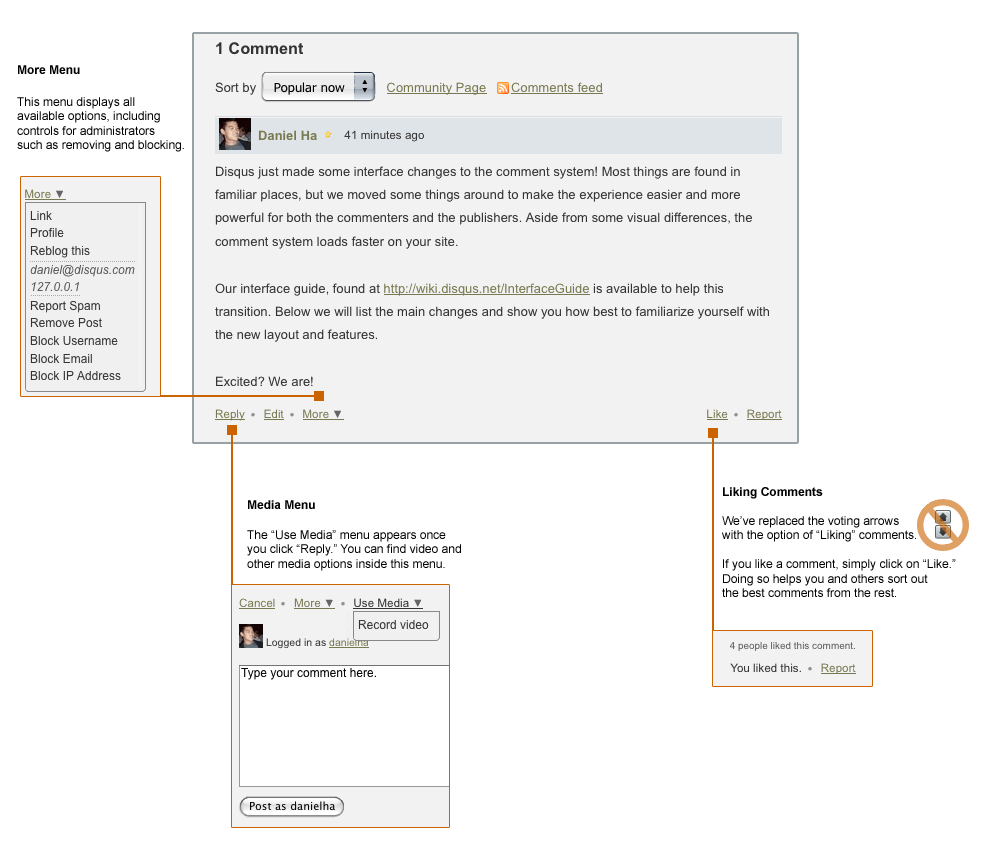
  • Voting arrows has been replaced with “Like.” You can now “Like” comments, giving the commenter a positive reputation point on Disqus and helping other readers discover great comments.
  • The More Menu is a new addition that brings up numerous options, such as reblogging. Moderators will find all the admin controls there as well, including removing comments and blocking options.
  • The Media Menu is where you will find the video comments toggle if you have this enabled. As we release more media functionality, they will be found here.
You can of course test the new Disqus right here, On Web Upd8.

3 Alternatives to Blogger's Default Comment System

I said "for Blogger" because blogspot.com's comment system sucks, but they also work in Wordpress, TypePad, Movable Type, Tumblr, etc.

These 3 websites let you change the comments system in your blog, by disabling your default comment module and replacing it with a new one (just a JavaScript).

1. IntenseDebate offers automated installation for WordPress, Blogger, TypePad, and Tumblr, comment threating and pagination like in the new Wordpress 2.7, full Gravatar support, reply-by-email, open-id support, import-export and of course commenter profiles. Also, when you post a comment with IntenseDebate you have the option to send a Tweet on a post-by-post basis letting your followers know you commented on a post.

IntenseDebate recently added plugins such as embedding YouTube videos or polls in comments.

Link to all the features.

Demo.

2. JS-Kit Comments (formerly Halloscan) supports automated installation for Wordpress and Blogger but you can insert the JavaScript on any platform.

Among top-features are: Akismet spam control, e-mail notification, skins and multiple display modes, comment pagination, rich text editor, YouTube embedded videos in comments, Gravatar support and comment sync with Wordpress and Blogger and of course, comment ratings and user carma, trackbacks/pingbacks, RSS feeds for the comment threads.

JS-Kit has probably the most features among these three alternatives.

Link to all the features.

Demo.

3. Disqus - automated installation for WordPress, Blogger, Tumblr, MovableType, TypePad but of course, you can insert the JavaScript code on any platform.

Disqus has all the features mentioned above like comment threading and pagination, commenter profile, Gravatar support and so on but also integrates best with your blog's CSS as Disqus tries to use the same colors ad your blog does. Also, you can se custom CSS for it.

For a demo, just check the comment form on this page, it uses Disqus :)

You're probably wondering why i use Disqus on my blog, and not the other two. Well, because for one: IntenseDebate did not work with Opera, i just couldn't click the "Submit" button, but mostly because it loads faster than the other services like it AND has all the features such a service needs. I fully recommend it.