Ubuntu / Linux news and application reviews.

GNOME Shell Clipboard Extension GPaste 3.8 And 3.3 Available In PPA

GPaste is a clipboard management system that comes with a command line interface as well as a GNOME Shell extension.

The application features URIs (remembers copied files, not just text) and pictures support, option to backup / restore the clipboard history and other useful features.

Gpaste 3.8

Install GPaste In Ubuntu Via PPA (Native GNOME Shell Clipboard Manager)

GPaste

GPaste is a clipboard management tool which comes with a command line client as well as a GNOME Shell extension. The application is very simple and doesn't support images, files and so on.

Parcellite Has A New Developer (And A New Version); ClipIt - Parcellite Fork With Ubuntu AppIndicator Support

Parcellite

The Parcellite (one of the best Linux clipboard managers) development stopped a while back and for a year there were no new versions. But Vladi pointed out in a comment that a new developer took over the project back in December and a new version has already been released: 0.9.3.

Diodon: A Lightweight Clipboard Manager With Ubuntu Indicator Applet Support

Diodon clipboard manager

Diodon is a lightweight clipboard manager for Linux written in Vala which "aims to be the best integrated clipboard manager for the Gnome/GTK+ desktop". It doesn't have as many features as Glippy, Pastie and so on but it's a lot lighter and only uses around 2.7 mb of RAM on my system.

Glippy Clipboard Manager Can Now Upload Images To Imgur

Glippy clipboard manager

Glippy is a clipboard manager for the Gnome desktop. Some of its main features are: Ubuntu appindicator support, it can store test from both keyboard and mouse (select some text using your mouse and it will be available in Glippy), you can easily access the keboard using a hotkey (CTRL + SUPER + C by default, but it can be customized).

Poll Results: Best Linux Clipboard Manager

The best Linux clipboard manager poll ended yesterday. There is no surprise concerning the winner: Parcellite won the poll with 287 votes (44.15%).


Here are the exact poll results:

Anamnesis - A New Linux Clipboard Manager With Full-Text Search

Anamnesis

Anamnesis is a new clipboard manager for Linux designed to be very easy to use by providing a simple interface with full-text search.

Anamnesis can be used both via command line and with a GUI. It doesn't come with a notification area icon / appindicator and can only be triggered by using a keyboard shortcut - but as I've read in the comments to our "Best Linux Clipboard Manager" post, a lot of you want this feature in a clipboard manager. If so, maybe Anamnesis is what you're looking for!

Best Linux Clipboard Manager

Here is a poll which was suggested multiple times: what's the best clipboard manager for Linux? Our poll options are: Parcellite, Glipper, Pastie, Klipper and Glippy but you can also enter your own answer:

Pastie 0.5.2 (Stable) With Any File Type Copy History Support Now Available In Its PPA [Linux Clipboard Manager]

pastie

Like we told you a while back, Pastie - a simple clipboard manager that makes use of the AppIndicator in Ubuntu - got an amazing new feature: it can now keep track of any file type (including images) as you can see in the screenshot above.

But that was a testing version only, which is now all grown up and available in the Pastie official PPA.


The version in the PPA also fixes an important memory leak bug in the testing version we posted a while back so it's important to upgrade to this version!

Pastie (Simple Clipboard Manager) 0.5 Gets Image / Any File Support - Test It Now

Pastie

Not so long ago, we were telling you about Pastie, a simple clipboard manager with Indicator Applet support. Since our first Pastie mention, it got an Ubuntu PPA and lots of versions released - which fixed bugs mostly, but a new feature was also added: a configuration dialog you can open by pressing "Ctrl + Alt + p".

Image support was probably the most requested feature back when we posted about Pastie. Well, Pastie got even better than that! Today, Pastie 0.5-pre is available (only Ubuntu .deb download for now - but it will be available in its PPA after some further testing) which doesn't get just image but any file support meaning Pastie will remember the files you've copied like you can see in the screenshot above. Pastie even remembers pieces of image you copy in GIMP or other image editing applications.


It is also a lot easier to change the Pastie icon, like Felipe (Pastie developer) points out on his blog: simply place the icon you want Pastie to use in the ~/.pastie/ folder. The icon must be renamed to "pastie.svg" ("svg" can be any other kind of usable type of image). A nice monochrome icon for Pastie can be downloaded from HERE.


Download Pastie 0.5-pre Ubuntu .deb (for both 32bit and 64bit)


Thanks to Felipe!

Pastie Gets An Ubuntu PPA

pastie

Pastie, the simple Linux clipboard manager we were telling you about yesterday got a PPA so you can stay up to date with the latest versions:

sudo add-apt-repository ppa:hel-sheep/pastie && sudo apt-get update
sudo apt-get install pastie


Along with the PPA, a new version has been released which brings some bug fixes.


Thanks once again to notsnippets

Pastie - Very Simple Clipboard Manager With Application Indicator Support [Ubuntu]

pastie


Using a clipboard manager in Linux is a must for most people because of a very old bug: if you copy something from one application, then close it and try to paste the copied text - it doesn't work.

Pastie is a very simple Linux clipboard manager with Application Indicator support so it will fit perfectly into your Ubuntu desktop.


Parcellite Linux Clipboard Manager 0.9.2 Released

Parcellite clipboard manager

Parcellite is a stripped down, basic-features-only Linux clipboard manager with a small memory footprint. Parcellite features include a clipboard history, various options to display items the way you like it, daemon mode, global hotkeys to display clipboard content quickly and perform custom commands using the clipboard contents.

Many though the project was dead since there were no updates for almost a year, but a new version has just been released (0.9.2).

ClipMon: Smart Clipboard Application For Windows

clipmonClipboard Monitor (or ClipMon) is one of those smart applications such as Blaze which are build with usability in mind and try to automatically make the action you were about to do yourself.
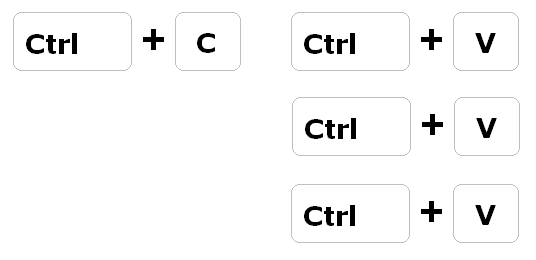
Save Time using Copy / Paste with CopyPasteTool

photobucketWindows only: Lightweight utility CopyPasteTool saves multiple strings of clipboard text, and then cycles between them easily using the keyboard.

Once installed, the utility puts an icon in your system tray—but otherwise runs completely in the background with very little memory usage. To use the new function, simply copy a couple of different pieces of text to the clipboard, and then hold down the Control key while hitting the V key more than once, and the utility will cycle through the various pieces of text on the clipboard. It's tiny, simple, and is meant to do just one thing—but it could be a very useful utility for anybody that does a lot of copying and pasting of simple text.

[via lifehacker & liferocks 2.0]