Ubuntu / Linux news and application reviews.

HandBrake 0.9.6 Released [Video Transcoder]


HandBrake is a cross-platform video transcoder that supports most common multimedia formats, DVDs or Bluray-like sources that aren't copy-protected. The application can even create chapters or add subtitles.

After more than a year, a new HandBrake version has been released: 0.9.6, and it includes many improvements, such as:

New Optical Disks Burner / Manager: Silicon Empire

Silicon Empire burning tool

Silicon Empire is a new tool written in Qt to burn and manager optical disks like CDs, DVDs and Blu-Rays.

Basenji 0.8 (Tool To Index Your CDs/DVDs, USB Devices And Network Drives), Released

Basenji

Basenji is a cross-platform tool you can use to index your CDs/DVDs and USB devices so you can later search the database without having plug the media into your computer.

HandBrake 0.9.5 Has Been Released (Ubuntu Installation Instructions)

Handbrake 0.9.5 screenshot

Handbrake is a multithreaded video transcoder that supports any DVD-like source and most multimedia file it can get libavformat to read and libavcodec to decode.

Even though it's not its first aim, Handbrake is used by many as a DVD ripper and it was voted as "best Linux DVD ripper" by the WebUpd8 readers.

Poll Results: Best Linux DVD Ripper

In our last week's poll, we asked you to vote for the best Linux DVD ripper.

Best Linux DVD Ripper

It's time for another weekly poll. For this week: best Linux DVD Ripper.

The candidates are: AcidRip, HandBrake, dvd::rip, OGMRip and k9Copy. But as usual, you can enter a different result if you want to, by selecting "Other" and then entering your anwser.


The poll:

MultiCD Builds a Multi-boot CD / DVD With Many Different Linux Distributions And / Or Utilities

multicd.sh


multicd.sh is a shell script designed to build a multiboot CD / DVD image containing many different Linux distributions and/or utilities. You can use it for instance to burn Gparted Live, Clonezilla and Ubuntu, all on the same multiboot DVD. When booting the CD / DVD, you will be able to choose which Linux distribution you want to boot on.

QDVDAuthor 2.1.0 Released

'Q' DVD-Author is a GUI frontent for dvdauthor and related tools. The goal is to provide an easy-to-use, yet powerful and complete interface to generate DVD menus, slideshows, and videos to burn on a DVD under Linux.


QDVDAuthor version 2.10 was released two days and it's a bug-fix release, but the author describes it as "the best QDVDAuthor release yet".


Bugs fixed in version 2.1.0:

HandBrake DVD Ripper And Audio / Video Converter Updated To Version 0.9.4, Adds 64bit Support

handbrake

HandBrake is a free, open-source video transcoder for Windows, Linux and Mac OS X. It supports any DVD-like source and most multimedia files and can convert into the following formats:

  • File format: MP4 and MKV
  • Video: MPEG-4, H.264, or Theora (1 or 2 passes or constant quantizer/rate encoding)
  • Audio: AAC, MP3, Vorbis or AC-3 and DTS pass-through (supports encoding of several audio tracks)


Among HandBrake features are:
  • Chapter selection
  • "Soft Subtitles" (not permanently rendered to frame)
  • Integrated bitrate calculator
  • Picture deinterlacing
  • Cropping and scaling
  • Grayscale encoding.

DVD Authoring Made Easy With Bombono DVD [Linux]

Bombono DVDBombono DVD is an easy to use open-source (Linux only) application for DVD authoring which you can use to create DVDs with menus, chapters, re-auhoring (import from other DVDs), burn the DVD and so on.

The main features of Bombono DVD are:
  • Excellent MPEG viewer: Timeline and Monitor
  • Real WYSIWYG Menu Editor with live thumbnails
  • Comfortable Drag-n-Drop support
  • You can author to folder, make ISO-image or burn directly to DVD
  • Reauthoring: you can import video from DVD discs.

To install Bombono in Ubuntu, paste the following commands in a terminal:

Get WinX DVD Ripper Platinum For Free [Limited Time Offer]

 WinX DVD Ripper Platinum

WinX DVD Ripper Platinum is the advanced version of WinX DVD Ripper. It is a professional DVD ripper which could rip different DVDs to popular devices such as Sony PSP, Apple iPhone, iPod, Apple TV, PDA, Zune, mobile phone, rip the content of DVDs to all popular video formats as AVI, FLV, WMV, MPEG, MP4, RMVB, 3GP, etc.

The original price of WinX DVD Ripper Platinum is $24.95. Now it is totally free available from Sep. 15 to Sep. 30 (give away for half month). Without registration code and you don't need offer any of your information. Just download it and you can backup your DVDs right away.

WinX DVD Ripper Platinum key features:

Create Professional Looking DVDs With Free Application DVDStyer [Windows & Linux]

DVDStyler

DVDStyler is a cross-platform (works on Windows and Linux) free DVD authoring application for the creation of professional-looking DVDs. It allows not only burning of video files on DVD that can be played practically on any standalone DVD player, but also creation of individually designed DVD menus.

Features:

* creation and burning DVD video with interactive menus
* support of AVI, MOV, MP4, MPEG, OGG, WMV and other file formats
* support of MPEG-2, MPEG-4, DivX, Xvid, MP2, MP3, AC-3 and other audio and video formats
* support of multi-core processor v1.7.3
* allows using MPEG and VOB files without reencoding, see FAQ
* allows put files with different audio/video format on one DVD (support of titleset)
* user-friendly interface with support of drag & drop
* flexible menu creation on the basis of scalable vector graphic
* import of image file for background
* placing of buttons, text, images and other graphic objects anywhere on the menu screen
* changing the font/color and other parameters of buttons and graphic object
* scaling of buttons and graphic objects
* coping of any menu object or whole menu
* dvd scripting

Download DVD Styler [Windows, source files]

Download DVD Styler for Ubuntu (.deb): Jaunty: i386 or amd64 || Intrepid: i386 or amd64 || Hardy: i386 or amd64

(Or you can add the PPA repository, following these instructions)

[via techie-buzz]

Simple DVD Slide Show Maker for Linux: Imagination

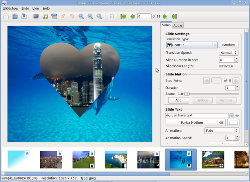
Imagination is a lightweight and simple DVD slide show maker for Linux.


Imagination is incredibly simple to use. Just start it up, then click the top-left button to create a new slide show. A new dialog box pops up, asking you for a name (and location to save) your new slideshow, along with the format and a couple other options. You have the choice to save your slideshow as either a VOB (Video Object), for direct burning to DVD, or as a Flash Video, for uploading to video sharing websites such as YouTube). And you're covered whether you live in Europe or the US, as Imagination supports both PAL and NTSC video formats, as well as 4:3 or widescreen.

Once you've created your slideshow, you'll want to add images to it. Simply click the picture icon in the toolbar and select one, or as many images as you like. Once in your timeline, images can be reordered by drag and drop. There are three options you have per slide - transition type, transition speed and slide duration.

The transition type is how Imagination shows the change between slides, and you have options such as cross fade, push in, wave, and more. Transition speed is controllable by selecting from fast, normal or slow. And slide duration is the amount of time your image will be shown on screen, not including time spent transitioning from the previous slide or transitioning to the next.

The latest beta release of Imagination is 2.0b1 released on 22/08/09 featuring Ken Burns effects allowing infinite number of stop points, text on the slides along with some text animations, ability to cut/copy/paste the slides and other improvements.


Download Imagination

Ubuntu users can install Imagination from the official Ubuntu repositories:
sudo apt-get install imagination

If you use another Linux distro, you must compile the packages from HERE.