Ubuntu / Linux news and application reviews.

Google To Integrate Twitter Search Too

Just a few hours after Twitter announced it would be integrated into Microsoft Bing search, Google also announced it will include Twitter status updates into it's search engine.


At Google, our goal is to create the most comprehensive, relevant and fast search in the world. In the past few years, an entirely new type of data has emerged — real-time updates like those on Twitter have appeared not only as a way for people to communicate their thoughts and feelings, but also as an interesting source of data about what is happening right now in regard to a particular topic.

Given this new type of information and its value to search, we are very excited to announce that we have reached an agreement with Twitter to include their updates in our search results. We believe that our search results and user experience will greatly benefit from the inclusion of this up-to-the-minute data, and we look forward to having a product that showcases how tweets can make search better in the coming months. That way, the next time you search for something that can be aided by a real-time observation, say, snow conditions at your favorite ski resort, you'll find tweets from other users who are there and sharing the latest and greatest information.


said Marissa Mayer, Vice President of Search Products and User Experience in a blog post.

Blogger: Submit Your COMPLETE Sitemap To Google, Bing And Yahoo

As always, if you are using a Blogger (blogspot.com) blog, you must do things a bit differently than others do. That's why a trick is needed to submit your complete sitemap (not just the normal RSS feed which only includes your latest 10 posts).

The trick I am talking about is more or less known, but Amit @ digital inspiration created a page where all you have to do is insert your blog address and you can instantly submit your whole Blogger sitemap to Bing and Yahoo and you also receive some custom RSS feed links for submitting to Google Webmaster Tools. Read on for a step-by-step how-to.

Perform Google, Twitter, Bing And Yahoo Searches Through Your IM Client

search bot

Sbot is a bot created by Tech Bangalore that lets you search Google, Twitter, Bing and Yahoo from within your instant messenger window. To use it, all you have to do is add a bot to your GTalk, Yahoo or Windows Live Messenger:

Google Talk – sbot@bot.im
Yahoo Messenger – searchbot@ymail.com
Windows Live Messenger - searchbot@live.com

Then open a chat window with Sbot and start searching:

Enable Bing Visual Search [Fix]

Like I told you yesterday, Bing launched it's visual search but I was unable to access that page. Well, it seems there's a trick you need to do if you live outside the US to enable the visual search.

1. Go to bing.com/worldwide and set your location to United States.

2. Now you can finally access bing.com/visualsearch.

Thanks to labnol for the trick!

Bing Launches Visual Search Feature

Microsoft senior vice president Yusuf Mehdi announced a new visual search feature on Bing which returns results as an interactive gallery of images.

For instance, if you type in “dog breeds,” it organizes them for you in a grid of images that you can scroll through using a slider on the right. When you hover over a particular image, it enters the name of that dog breed in the search box. And you can re-order the image results by size, breed, exercise needs, and Bing popularity.

There are more than 100 visual galleries ranging from movies, books, and cars to products, animals, and sports teams. The sorting categories change each time. So for movies, you can filter by release date, title, or rating. Cars can be sorted visually by make, price or mileage.

ZapBing Uses Bing Images As Your Desktop Wallpapers

bing

The (almost) new Microsoft search engine - Bing changes it's image based on your location, daily. These images come in HD quality (high definition) so why not use them as wallpapers? You can now use those HD images as you wallpaper, automatically, by using the freeware Windows application called ZapBing.

Since Bing was launched, there have been about 200 different images used... You can view Bing's image gallery, HERE.

ZapBing works on Windows 2000/XP/Vista and Windows 7 and requires .Net Framework 3.5 or higher.


Download ZapBing.

Microsoft Launches BingTweets, Side-By-Side Search Results for Bing and Twitter

bingtweets

Bing was the first of the big search engines to integrate Twitter into results, albeit, not in the most exciting of implementations. Today, Microsoft’s fledgling search tool is doing a bit more with Twitter, launching BingTweets, a separate site that combines Bing search with Twitter search and trending topics. For example, search BingTweets for “All Star Game” and on one part of the page, the Bing search results will load, and next to them, recent tweets containing the same term. BingTweets also has a built-in option for tweeting the search result, as well as a “Trending Topics” box that extends beyond Twitter’s top ten to include currently popular topics, places, people, and products.

But this being a Microsoft product, it does not work for now, at least for me, though it seems to work for some people :)

[via mashable.com]

Compare Google And Bing Search Results Side By Side

google bing side by side search

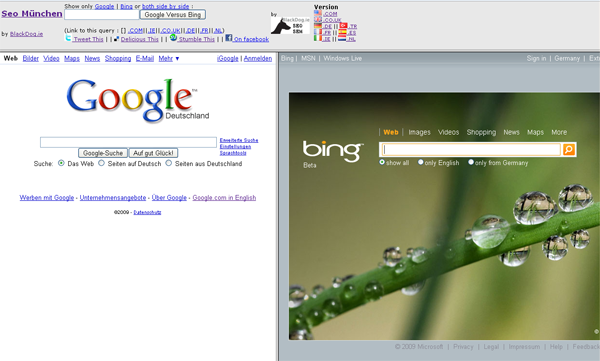
http://www.blackdog.ie/google-bing/ is a website where you can test search results from Google and Bing - side by side. You can also do some localized searches from: .de, .co.uk, .fr, .ie, .es, nl and .tr.

It is a very interesting SEO tool which allows you to see how both search engines handle your query and which one gives you the best results.

Here is how a search for WebUpd8 looks like.