Ubuntu / Linux news and application reviews.

Wunderlist Installation Script Updated For Ubuntu 12.10 Quantal Quetzal

wunderlist ubuntu

Wunderlist is a cool task management application available for Windows, Linux, Mac, iOS and Android.

Wunderlist 2 was announced a few days ago, but it's not yet available for download and as you know, to use Wunderlist in Ubuntu, you need some tweaks or else the application doesn't start. So, until the new version is ready, you can use our script to get Wunderlist to work in Ubuntu.

Awesome Task Management App `Nitro Tasks` Adds Web Version, More

nitro tasks

Nitro Tasks is a featureful to-do list application that helps you keep your tasks organized by letting you easily create lists, add tags, set due dates for your tasks, add notes, set priority and more.

Box.net Adds Tasks and Public Folders

Today, Box.net introduced 2 new features (well 3 actually, but one is not interesing):


- Tasks: Create, assign and manage tasks around your files.
- Global Folders: Turn a folder of content into a publicly shared webpage with your own personalized URL - no HTML or web coding required.
- Custom Branding: Customize the look and feel of the Box UI to project your company’s brand whenever you share content with internal and external partners.


Tasks: Be more productive in creating your content
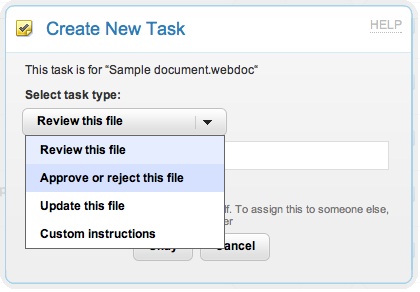
Tasks is a simple way to manage workflow around creating, reviewing and finalizing content. For new or existing files, you can assign yourself, someone else or a group of people to:


- Review a file: For those “take a look and let me know what you think” situations.
- Approve/reject: Get the final word.
- Update a file: Ask someone to upload a new version of a file.
- Custom task: Create your own kind of task. Like “Publish on Website.”


To create a task, simply hover your mouse over any file, click “Tasks” and select what kind of task you would like to assign. You can create multiple tasks and even include comments.


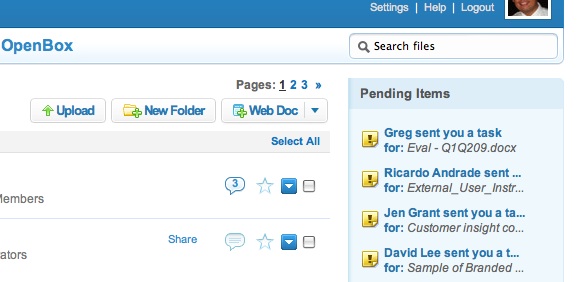
Keep track of tasks on the Box sidebar in the “All Files” view.


It’s a great way to keep track of what you need to do in the same place you manage all your content.


Global Folders: Share your content with the world…in seconds
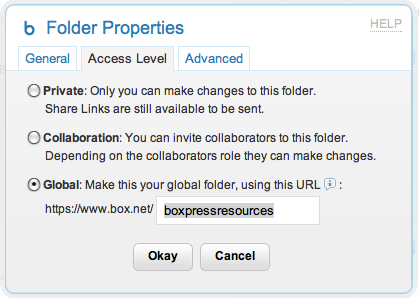
Sharing has always been at the heart of the Box experience. Global Folders lets you take any folder of content and share it as a public webpage with your very own personalized, static URL. In other words, it’s a way to broadcast any of your content to the world.


It only takes a few clicks and no web or HTML coding experience whatsoever. At the “All Files” level, click on the “Share” button and select “Customize this address and make global”.


From here you can select the Global folder option, create your own URL and you’re set to go.


Task Automation for Windows

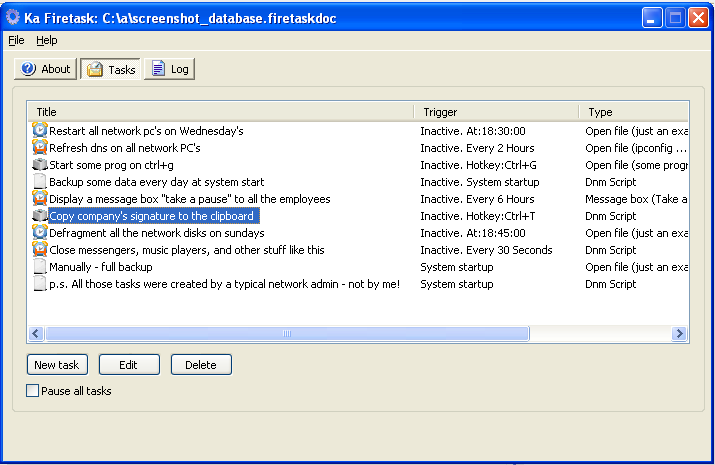
photobucketFiretask is a free application which can be used to schedule automated tasks in Windows. Windows comes with a Task Scheduler but it has its limitations and does not offer as much flexibility as Firetask does. You can use it to run programs, take incremented screenshots, copy files and folders, display message dialogs and run DNM scripts. It comes with a scripting language which makes it easier to create some very sophisticated tasks.

On running the application for the first time, you can also download some ready to use tasks from the Internet or can add some tasks on your own. The tasks can be triggered by using a hotkey or at a particular time. It gives you a lot of option while adding a new task. You can select the title of the task, the days of the week it should run, should it start as the system starts or run at a particular time or with a hotkey. It can even be used to monitor your applications and close unwanted applications the moment they run. You can even use it to run some programs at a specified time or remind you about something. You can even schedule some copy paste tasks or modify the clipboard contents. If you are familiar with scripting languages, you can use it to create some advanced and sophisticated tasks.

The program is a very good alternative to windows task scheduler as it offers some good features. It is a freeware and runs on Windows.

[via whoismadhur.com]