TrueTwit is a Twitter service which will help you fight spammers. TrueTwit works by sending a DM to each new Twitter follower you have with a verification link where the follower needs to enter the Captcha seen in the image. You will then be notified by email if your new followers pass this verification or you can set TrueTwit to automatically follow them once they have passed the verification.
While in theory, this sounds like an amazing service, it has the downside that it needs to send a direct message to each of your new followers - a behavior which most of the times is considered as spam so people might ignore your message. But TrueTwit might use another method for verifying users:
Let's face it: most Twitter direct messages are spam. If that's the case for your Twitter account and even if not, you may sometime want to delete all the DMs and for that, you need to make a lot of clicking. For instance, here are may latest received direct messages:
DM Whacker works very simple: just click the bookmarklet while on your Twitter inbox page and some options are instantly displayed in the top right corner.
Replace foo with your email username and bar.com with the domain of your email. Here it is in action:
3. Javascript using MailToEncoder
Go to MailToEncoder and enter the email address you want to hide and paste the javascript code where you want to display your email address.
The code looks like this:
<script type="text/javascript"><!--var egikmgo = ['u','a','e','f','o','r','l','8','e','p','>','d','<','"','w','.','w','a','h','=',' ','u','m','l','p','e','a','.','c','b','g','o','m','i','b','m','@','>','i','m',':','t','c','@','"','8','<','i','g','d','l','m','/','a','o','a'];var ujyczmr = [38,54,36,6,31,4,28,22,5,39,34,40,0,8,16,29,35,26,3,7,2,19,25,47,20,17,45,48,30,37,43,50,32,46,18,51,23,55,27,9,15,13,49,42,33,41,52,11,24,21,12,44,53,10,14,1];var btuarfv= new Array();for(var i=0;i<ujyczmr.length;i++){btuarfv[ujyczmr[i]] = egikmgo[i]; }for(var i=0;i<btuarfv.length;i++){document.write(btuarfv[i]);}// --><</script><noscript>Please enable Javascript to see the email address</noscript>
And here it is live:
Bonus: combining method #1 and #2
Go to this website and enter the first part of your email (the text before @) - let's name it code#1 and then do the same thing for the second part of your email (the text after @), let's call it code#2. Now enter the following code where you want to post your email address:
It was only a matter of time: Twitter trending topics are now being exploited by spammers. Now that trending topics – the most talked about items on Twitter at a given point in time – are integrated as part of Twitter’s web experience, marketers are quickly realizing that these can be exploited to generate traffic.
How? Simply include the trending term in your tweet. Then, anyone who clicks the trending topic will see your ad, for free. Today’s example comes in the form of “Apple Shampoo,” which is apparently a new song from Blink 182, being shared aggressively today because of the meme #musicmonday, which is also trending.
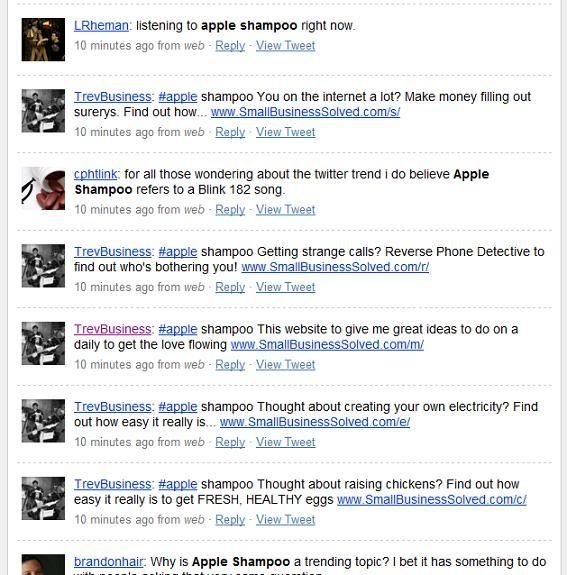
Here’s an example. Most of the tweets below really have nothing to do with the band, the song, or #musicmonday, but are rather an ad for some sort of affiliate marketing scheme. Visiting the offending user’s account on Twitter, it’s clear that they’re simply using Twitter to push affiliate links, and now exploiting trending topics to gain more traffic.
Putting yourself in the mind of the spammer for a moment, here’s why this is so attractive: unlike typical Twitter spam, which involves mass following in hopes of gaining return followers, this is far more convenient and harder for Twitter to police. As opposed to needing to build up a following in order to get traffic for your message (Twitter has been doing a much better job of stopping this), now all you need to do is include a trending topic in your tweet.
It’s an ugly new twist on Twitter spam that is going to de-value Twitter search until the company figures out a way to stop it. For now, the best way to help stop the problem is probably to utilize the @spam Twitter account
Ever wanted to share your email address with someone in a public forum, website contact info, blog comments and so on but don't want your email address to be discovered by spam bots that crawl the internet? Scr.im can help.
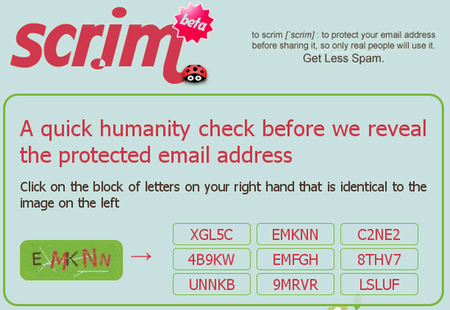
Scr.im is a very simple service that can convert your email address into a short, cute and safe link you can share on the web, in Twitter, forums, Craigslist, anywhere. It works like this: You add your email address to Scr.im, it gives you a small URL—like this one—that requires you to pass a captcha to view the email address.