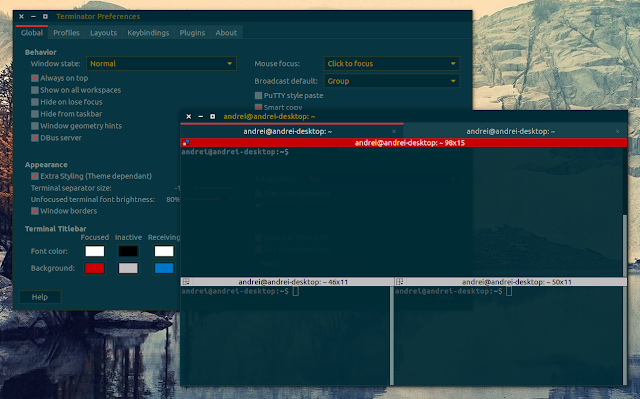
Terminator is terminal emulator which includes numerous useful features such as multiple terminals in the same window (split view), notifications, supports saving and restoring custom layouts and much more.
Terminatoris a very interesting terminal emulator that lets you use multiple terminals in the same window (split view). It supports notifications (through 'watch for activity' plugin), tabs, can save / restore custom layouts and more.
Terminator is a very cool terminal Emulator for GNOME. It supports tabs and notifications, you can get multiple terminals in the same window and many other cool features.
Terminator 0.96 is supposed to get "Quake mode" (like Guake or Yakuake; this mode lets you hide/unhide the terminal using a keyboard shortcut in a Quake-like drop-down), but it's been almost an year since the last release and this version still hasn't been released so I've built Terminator from BZR in the WebUpd8 unstable PPA so you can use the new "Quake mode" feature even though version 0.96 hasn't been released yet.
I am aware of Guake (Gnome), Yakuake (KDE) and so on, but this post is about using drop-down grid terminals using Terminator. Read on!
I used to love Yakuake - a drop-down terminal which will remind you of the Quake console - and used it for about an year but then I decided not to install any KDE libraries in Gnome so I switched to Guake. Guake is nice but you can't have multiple terminals in one window and lacks a lot of the customization that was available for Yakuake.
Terminator on the other hand supports multiple terminals in one window, has tabs support, you can save your own custom layouts, has a built-in "watch terminals for activity" option and supports many other customizations but you can't use it as a drop-down terminal, Quake-style. By default that is, because you can actually do this using the Compiz "Widget Layer" plugin.
Here is a video demonstrating how to configure Terminator to use the Widget Layer Compiz plugin and of course, see the actual Terminator using Widget Layer in action (the how-to result is displayed later on in the video, so watch it till the end):
Terminator is a terminal emulator which supports multiple terminals in one window that you can arrange in whatever way you want. Besides the grid, Terminator also supports tabs and comes with many useful features.
Terminator 0.94 which was released today got a really new cool plugin called "watch terminals for activity" which displays a notification bubble (in Ubuntu it uses NotifyOSD) when there is activity in a certain terminal you want to watch. This has many different uses like getting notified when a download (using wget or whatever) completes and so on.
Exaile 0.3.1.1 was just released, fixing some nasty bugs:
an issue that could cause exaile to be unable to run without installing was fixed
the tagger now only writes to changed files, not all selected files
an edge case that could result in new playlists not being saved was resolved
album shuffle now properly respects discnumber tags and double-digit tracknumber tags
arguments passed to the installed exaile script are now properly quoted, resolving issues with using filenames that had spaces or unusual characters in them.