Ubuntu / Linux news and application reviews.

How To Get Pino Without OAuth To Work With Twitter Again

Pino

As you probably know, the Twitter OAuthpocalypse took place and all the Twitter clients which do not use OAuth no longer work.

One such Twitter client is Pino which unfortunately has not yet been updated to use OAuth and no longer works. But you can still get Pino to work, even though it doesn't support OAuth - and this might also work for other Twitter clients, but I've only tested it for Pino. Here's what you need to do.
How to make Pino with no OAuth work with Twitter

Add Twitter Connect (oAuth) for Your Wordpress Blog Comments using Twit Connect Plugin

Since today I was telling you about Disqus adding Twitter Connect alongside Facebook Connect to their comment system (which you can see right here on Web Upd), I search for a similar plugin for users that don't use Disqus and have a Wordpress powered blog.

Twit Connect is a Wordpress plugin that you can use to allow your readers to login using Twitter and post comments to your blog. It uses Twitter Connect API (obviously) (oAuth).

Here's how to use it:

1. Download the plugin
2. Unzip it to / wp-content/plugins /
3. Activate it from your admin panel.
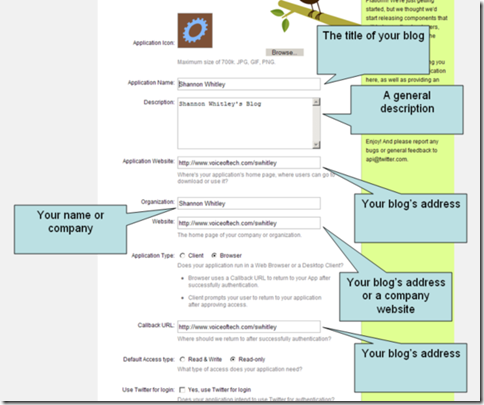
4. Now you have to configure it by entering the Consumer and the Consumer secret key, from Twitter which you can get from here.
5. In case you don't know how to fill up the form from step 4, here is the form explained:

photobucket

After completing all the above steps, this plugin adds a button on the comment form on your blog which users can then use to login into their Twitter account an leave comments as usual. And of course, the nickname is linked to their Twitter profile.

This version also sports a choice of two different buttons, the new button is from Peter Denton’s “Signin with Twitter” button set.

[via puntogeek & voiceoftech]