Ubuntu / Linux news and application reviews.

GWoffice Brings Google Drive To Your Ubuntu Desktop

gwoffice

GWoffice (Google Web Office) is an application that integrates Google Docs (now Google Drive) with the Ubuntu desktop, providing basic synchronization support for offline use. From its interface you can create new documents and edit or download existing documents.

Easily Sync Your Local Documents With Google Docs Using Super Flexible File Synchronizer

Super Flexible File Synchronizer


Super Flexible File Synchronizer is a cloud backup and synchronization tool that supports FTP, SSH, WebDAV, Amazon S3, and Google Docs. The application is cross-platform, but only the Linux version is free (though it's proprietary).

Super Flexible File Synchronizer uses ZIP compression and data encryption and comes with multiple synchronization modes, like Standard Copying, Exact Mirror, and SmartTracking.

Probably the most interesting thing about Super Flexible File Synchronizer is the Google Docs support which you can use to easily synchronize your documents from / to your computer, so any changes you make on Google Docs an be synced with your computer as well as the other way around. The application also supports synchronizing files between two Google Docs accounts, or between any of the supported services / protocols.

ReText Gets Improved Google Docs Export, More

Retext text editor linux

ReText is a text editor for MarkDown syntax that supports some popular formats such as PDF, ODT, HTML and plain text. It has tabs support, live previews, web pages generator, HTML syntax highlighting, KDE integration and more.

Unity Google Docs Lens For Ubuntu 11.10 Oneiric Ocelot

Unity Google Docs Lens Ubuntu

Unity developer Neil J. Patel has created a cool Google Docs Unity lens for his Ubuntu App Developer Week session. And even though this was just to show how to develop Unity lenses, Gdocs Unity Lens is functional and Neil will develop it further.

LibreOffice Google Docs Sync Addon "Ooo2gd" Now Lets You Upload Files Without Converting

A while back we wrote about an OpenOffice addon called "Ooo2gd" which lets you synchronize your documents with Google Docs, Zoho and WebDav servers (either manually - when you're done editing the file, or automatic sync; you can also import files that are already available on the server).


LibreOffice upload to Google Docs

Well, you'll be glad to know that Ooo2gd works with LibreOffice too. Also, the latest Ooo2gd version (3.0.0), released earlier this month comes an option to upload to Google Docs without converting the files (so you can keep the original file format).

Unity Launcher To Upload Files To Google Docs Using Drag And Drop

Unity Google Docs Launcher

A Reddit user has created a custom Unity launcher that lets you upload documents to Google Docs using drag and drop and once the file is uploaded successfully, it opens the document in your default browser.

The script was then improved by another Reddit user and I've combined everything and slightly modified it so it works with any browser (initially it was using Chromium "apps" and you can still use that if you want by editing the file) so it's easier to install.


Features:
  • drag and drop upload to Google Docs
  • automatically opens uploaded files in a new browser tab
  • clicking the icon (without uploading a new file) opens Google Docs
  • you can right click it to create a new Google Docs presentation, document or spreadsheet.

There's one limitation though: you can only upload one file at a time (which is OK actually since each upload opens a new browser tab so if you upload a lot of files at once it gets confusing).

Here's how to set up this Unity launcher Google Docs uploader.

Synchronize Your OpenOffice Documents With Google Docs, Zoho And WebDAV Servers Using Ooo2gd

Ooo2gd is an OpenOffice addon which you can use to keep your documents synchronized with Google Docs, Zoho and WebDAV servers. You can either manually select to upload a file to Google Docs / Zoho when you're done editing it or you can select to automatically synchronize it.

GoogleCL: Manage Any Google Service Via Command Line (Linux)

googlecl


I was just reading about GoogleCL at Lifehacker and after testing it for a while I realized it's actually very useful.

Using GoogleCL - a command line tool to manage all the Google services -, you can upload photos to your PicasaWeb albums, post to your Blogger blog, modify Google Calendar events, add contacts, manage your Google Docs (upload, delete, and so on) and even upload videos to YouTube. Unfortunately it doesn't come with support for Gmail.

Google GDrive Finally Coming (Or Pretty Close)


There were rumors for quite a long time that Google will one day release a cloud service called GDrive. They aren't launching GDrive, but instead they are allowing users to upload any file types to Google Docs which is basically the same thing:

Google Docs Turns Images Into Editable Text (OCR)

Google Docs can now perform OCR to typewritten or printed text, meaning it can turn images into editable text.

Image and video hosting by TinyPicImage and video hosting by TinyPic
Original imageEditable text (result)


The OCR feature in Google Docs is not part of the standard UI yet but you can use this sample form to upload scanned images to your Google Account and the server will automatically try to extract text from these images provided the image resolution is good and that the text inside images is written using Latin character sets.

[via labnol.org]

Notepad Alternative Which Synchronizes Your Notes With Google Docs

Nocs is a free and open-source Notepad alternative that uses Spreadsheets API to upload and synchronize text documents with Google Docs (Windows only). This allows quick editing regardless of user or physical location.

nocs

Features:

* all the basic functionality of the Windows Notepad
* login with a Google account
* change the Google account on-the-fly
* encrypt your documents
* auto-save after a specified timeout
* find & replace with regular expressions

Cross-Platform Google Docs Batch Uploader Lets You Upload All The Files In a Folder To Google Docs

If you want to upload a lot of documents to Google Docs, it's difficult to upload them one by one. You can send the documents by email, but this option is not very reliable and not all the formats are supported.

Google Docs Batch Upload, developed by Anton Beloglazov is a command-line Java application, so it should work in Windows, Mac, Linux, as long as you have JRE 1.6 and you can use it to upload multiple files at once to Google Docs.

Google Docs Folders as Labels - Howto


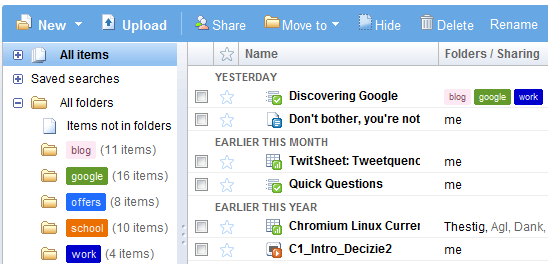
Google Docs has a flexible system of organizing documents. While initially Google Docs used a labeling system similar to the one from Gmail, the current version combines the benefits of labels with the simplicity of folders. The interface names them folders, but they're actually hierarchical labels.

You can add a document to multiple folders without creating copies. Just go to "all items" and drag the document to more than one folder. Since the sidebar doesn't show subfolders, you can't drag the document to a subfolder.

What if you want to remove one of the labels? There's no interface option for this, but you can use this workaround: click on the label you want to remove in the sidebar and drag the document to one of the other labels. To remove all the labels, drag the document to "Items not in folders".

Google's hybrid between folders and labels still needs some improvement: subfolders are not displayed in the sidebar, you can't add multiple labels in a single step and it's not obvious that folders are actually labels.

via googlesystem

Desktop Utility that Mounts Google, Windows Live, and Other Web/Cloud Storage Applications as Locally Backed-up Folders: Gladinet

photobucketGladinet, the desktop utility that mounts Google, Windows Live, and other web/cloud storage applications as locally backed-up folders, boasts about new stress-tested stability and compatability in its just-out release candidate download.

There's not a lot of whole-cloth new features or support in this release candidate, but when it comes to backing up Google Docs, Picasa Web Albums, Windows Live SkyDrive files, Amazon S3, or other cloud storage services, knowing that you could leave Gladinet backing up overnight without crashing is, in itself, kind of an important feature. And with better support for SkyDrive's free 25GB of storage space that landed between the first Gladinet beta we toured through and now, this Windows utility could be a whole lot more helpful.

Download Gladinet Release Candidate (Windows Only) [via lifehacker.com]