Ubuntu / Linux news and application reviews.

Google Calendar Indicator 0.2.0 Released With Bug Fixes

Calendar Indicator, an Ubuntu AppIndicator for Google Calendar, was updated to version 0.2.0, receiving some important bug fixes, including a fix for the calendar events not showing up in the indicator menu under Ubuntu 13.10 Saucy Salamander.

Google Calendar Indicator Ubuntu

Google Calendar Indicator Adds Options To Create, Edit And Delete Events, More

Google Calendar Indicator

Calendar Indicator, an Ubuntu AppIndicator for Google Calendar, has been updated to version 0.1.0.0.

The new version brings options to add, edit and delete Google Calendar events as well as to create new calendars. Until now, Calendar Indicator would only display Google Calendar events in the indicator menu and through notifications. There's also a new option to select the calendar to be used from all your Google calendars (or you can select all of them).

How To Synchronize Google Calendar With Thunderbird

You can use Lightning to get a calendar that's fully integrated with Thunderbird, but what about Google Calendar synchronization? Well, there's an extension called "Provider for Google Calendar", which lets Lightning read and write events to Google Calendar.

Calendar Indicator Displays Google Calendar Events On The Ubuntu Panel (Without Evolution)

google calendar indicator

Calendar Indicator is a new tool to display your Google Calendar events on the Ubuntu / Unity panel.

You can already do that with Evolution and Indicator DateTime, but there are some differences: firstly, the obvious: you don't need Evolution to use Calendar Indicator. And secondly, Calendar Indicator displays the next 10 upcoming Google Calendar events at once, so you don't have to scroll through dates to see your Google Calendar events.

How To Integrate Google Calendar With Unity / GNOME Shell Through Evolution

Evolution Google Calendar Unity

Back when we've posted about integrating Google Calendar with GNOME Shell (without Evolution), some of you didn't know how to do this with Evolution. So here is how to set up Evolution to display Google Calendar events in the Unity / GNOME Shell calendar.

Google Calendar GNOME Shell Integration

GNOME Shell Google Calendar

GNOME Shell Google Calendar is a tool that integrates Google Calendar into GNOME Shell.

The python script uses GNOME Keyring for storing your password and automatically fetches new Google Calendar events when you click the GNOME Shell calendar on the top panel. For now, you can't configure which calendar is imported (all are used) and there's no configuration GUI (but it's still very easy to use).

You can already do this through Evolution, but using this script, Evolution is not required.

Display Google Calendar On Your Desktop Using Gcalcli And Conky

Google Calendar desktop ubuntu

This post explains how to display Google Calendar on your Desktop using Conky and Gcalcli (a tool you can use to manage Google Calendar via the command line).

If you already have a Conky instance running and want to also display Google Calendar on your desktop using Conky, see this how-to on running multiple Conky instances.

GoogleCL: Manage Any Google Service Via Command Line (Linux)

googlecl


I was just reading about GoogleCL at Lifehacker and after testing it for a while I realized it's actually very useful.

Using GoogleCL - a command line tool to manage all the Google services -, you can upload photos to your PicasaWeb albums, post to your Blogger blog, modify Google Calendar events, add contacts, manage your Google Docs (upload, delete, and so on) and even upload videos to YouTube. Unfortunately it doesn't come with support for Gmail.

Import The World Cup 2010 Fixtures Into Google Calendar [Football]

world cup 2010 google calendar fixtures

We're going to be a bit off-topic, but for a good reason: the 2010 Football World Cup is coming and I saw a post on the Ubuntu Planet about a World Cup 2010 Google calendar and had to share it with you.

To make sure you don't miss any game, you can download the calendar as an XML, iCal or simply click HERE and then at the bottom of the page you should see a "Google calendar" icon - click it and it'll import the World Cup 2010 fixtures into your Google Calendar account.

Oh, and a final note: the calendar is in English but supports any timezone so in the last URL above you can edit the "Europe/Bucharest" parameter to fit to your timezone.


Update: another World Cup related article -> How To Watch The World Cup 2010 Live (Online) In Linux [Free]


Thanks to Brett Alton!

Googsystray: Unified Google Services Notifier [Windows, Linux]

Googsystray is a Google Voice, Gmail, Google Calendar, Google Reader and Google Wave checker application for Windows and Linux. The idea is to be able to keep track of all that stuff without having to keep a bunch of browser tabs open, or constantly checking them.

Googsystray

Integrate Google Calendar Into Your Gnome Calendar [Linux]

To integrate Google Calendar events into your Gnome desktop, go to Google Calendar, click on "Settings", then on the "Calendars" tab and then on your calendar's name:

google calendar

Then, at the bottom there is a section called "Private Address:" > click on the "ICAL" green icon to get your private calendar URL, like in the picture below:

google calendar private links

Now all you have to do is open a terminal and paste this:
/usr/lib/evolution-webcal/evolution-webcal URL
replacing URL with your ICAL private URL you got in the step above.

A window will pop up and here is where you can make the update frequency settings (I set mine to update every 30 minutes).

This is how your Google Calendar tasks, appointments, etc will show up in Gnome Calendar:

gnome google calendar


Please note: evolution-webcal may be in different folders in different distros. (For example in SuSe, it’s in /opt/gnome/lib/evolution-webcal/evolution-webcal). If the above code doesn’t work for you, you can locate evolution-webcal using:
find / -name evolution-webcal


[via paraisolinux]

Google Calendar Gets Experimental Labs Features Too

Even though incredibly basic, Gmail Tasks has provided a simple way for Gmail users to create to-do lists while processing email. Today, Tasks is graduating from Labs to become a default email feature accessible under the “Contacts” link.

Tasks graduation from the feature testing playground is the first ever for the Labs program, and demonstrates the overall value and success of adding experimental features into Google products.

google calendar labs

Now that proof of concept has been established, Google is announcing that, starting today, Labs will take up residence in Google Calendar too. Here’s how it works: in the Settings section of your Google Calendar, you’ll now see a new tab labelled “Labs.” There, just as in Gmail, you’ll find experimental functionality just for your calendar, and you can enable or disable any of the options.

Google Calendar Labs is launching with six new features, and though they haven’t been turned on for us just yet, the Google Apps Blog post introduces a few of them by saying, “Try out Next Meeting, which shows you how much time you have to procrastinate. Free or Busy allows you to see which of your friends or coworkers are currently in meetings. And World Clock lets you keep track of different timezones when you schedule meetings.”

Plus, should you want to build your own Calendar features, you can do so with the newly released experimental API. We hope to see this API inspire a number of third-party calendar gadgets that we can use to better plan, manage, track, and share our busy schedules.

Google Calendar Desktop Client

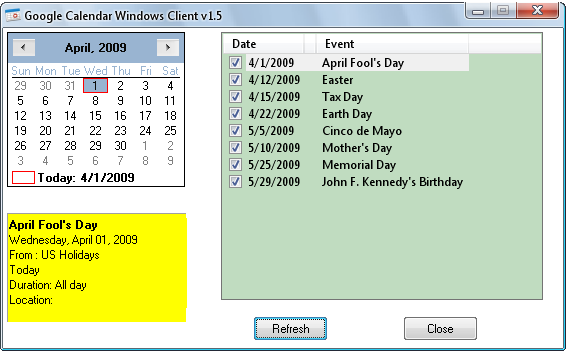
Google Calendar Client is a freeware (Windows only) portable application that allows you to access Google Calendar from the desktop.

photobucket

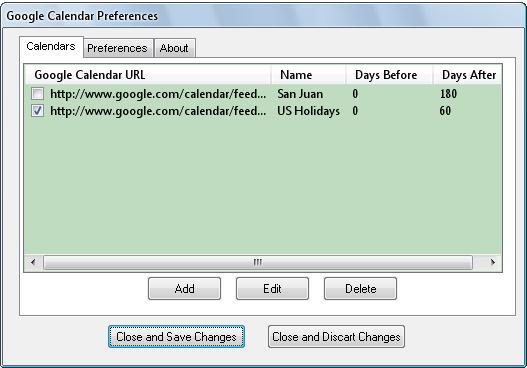
The best part the software is that it allows users to access multiple calendars from a single interface.

photobucket

You can also setup the application to popup reminders, and export individual events to Outlook.

[via instantfundas.com]