Ubuntu / Linux news and application reviews.

Whisker Menu 1.5.0 Released, Install It In Xubuntu Or Linux Mint Xfce

Whisker Menu 1.5.0 was released yesterday, bringing new options for setting the background opacity and displaying your profile picture, customizable recently used limit and more, as well as quite a few bug fixes.

WhiskerMenu Xubuntu

Xfdashboard: GNOME Shell Like Dashboard For Xfce

Xfdashboard is a GNOME Shell like dashboard for Xfce: it displays an overview of the currently open applications, allowing the user to switch between them, an application launcher / finder as well as a workspace selector.

Xfdashboard Xfce Xubuntu

Xfce App Launcher `Whisker Menu` Sees New Release

Whisker Menu is an application menu / launcher for Xfce that features a search function so you can easily find the application you want to launch. The menu supports browsing apps by category, you can add applications to favorites and more.

Whisker Menu 1.4.0

Whisker Menu Update Brings Support For Opening The Menu Using A Keyboard Shortcut, Other Enhancements [Xfce]

Whisker Menu is an alternative to the Xfce application menu that features a search function so you can easily find the application you want to launch. The menu also supports browsing apps by category, you can add applications to favorites and more. The menu is used by default in Linux Mint 15 Xfce.

The application was updated recently, getting a much requested feature: you can now open the menu using a keyboard shortcut (though you must add the keyboard shortcut manually - see below), along with other enhancements and fixes.

whisker menu

Whisker Menu: Fast Application Launcher Featuring Search Function For Xfce

Whisker Menu is an alternative to the Xfce application menu that tries to make finding and launching applications easier.

The tool allows you to quickly search for the application you want to launch or, if you don't know the application name, you can browse all the applications installed on the system by browsing through categories.

Whisker Menu Xfce

Kubuntu Netbook (10.10) Application Menu ("Global Menu") Is Finally Ready!

appmenu kubuntu 10.10


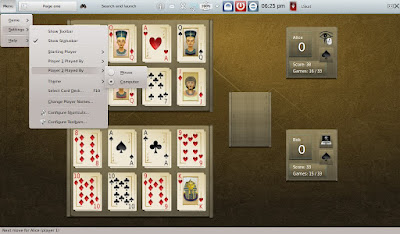
Kubuntu Netbook (10.10) finally got its application menu integration ready yesterday (turned off panel auto-hiding by default).

As you can see in the screenshot, it's not exactly the same like on Ubuntu Netbook Edition 10.10 maverick Meerkat, but it's built on the same technologies.

The Kubuntu Nebtook "global menu" also works with GTK/GNOME applications (but for now you'll have to install some additional packages for this):

Application Menu (Global Menu) For Ubuntu Netbook Edition 10.10 Is Available For Testing

indicator applet appmenu ubuntu

The Global Menu for Ubuntu Netbook Edition 10.10 has just been uploaded to a PPA (it's still building, but should be ready in a few minutes). The new "global menu" is called "Application Menu" and it can be installed in Ubuntu 10.04 Lucid Lynx already (both in GNOME and KDE). Here's how.