The all got fixed! Since there are so much changes, we no not list all new and updated plugins here. There were changes on nearly all of them.
 JDownloader now comes with OCR methods for over 35 different servies. Enable or disable them indivudually.
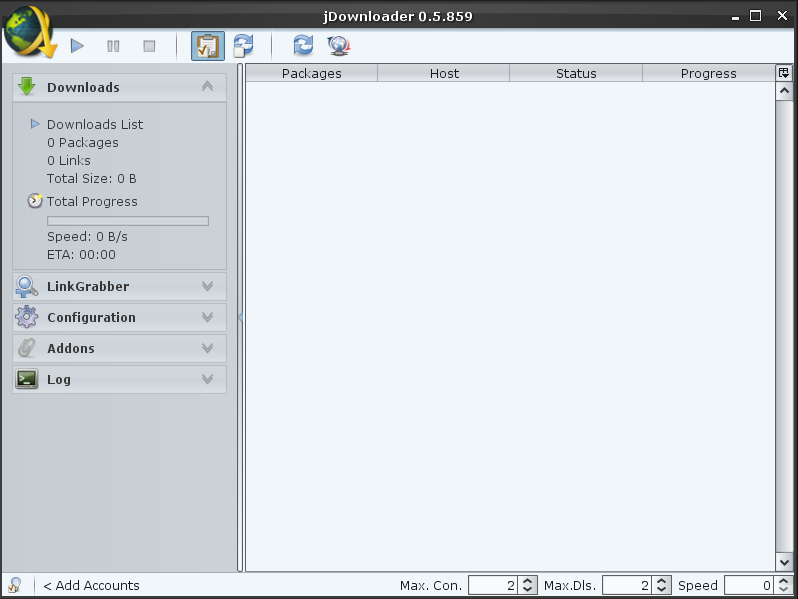
 JDownloader now uses a collapsible sidebar layout. You will experience, that you always have all currently important interactions either in the context (right click) or sidebar menu.
 The amount of windows was reduced to keep the app simple. Most addons and modules no are placed in the main frame. Even the linkgrabber has no popup any more.
 There now are various options to boost JDownloader's GUI speed. Disable advanced effects in the interface configuration, disable window decoration or switch to the low-performance-style (first style in list)
 There is no menu any more. The sidebar and the new startmenu provide all interactions you need. Just click the JDownloader logo in the top-left corner.
 Most of the premiumusers know: “To use a premiumaccount, you have to activate premium globally”. This has NOT changed. But the Global premium switch no provides more features… Click it with the left mousebutton, and you enable/disable premium globally. A right click invokes the premiumquickmenu. Open your favourite hoster's configuration as fast as possible.
The quick-Premium button is located at the bottom-left corner.
 JDownloader now uses Hoster's logo instead of text.
If you like to use custom hoster icons, just createan icon with the hoster's domain in
jd_home\jd\img\hosterlogos
for example:
jd_home\jd\img\hosterlogos\mysamplehoster.com.png
The icons have to be in png format, and should be 16×16 Pixel.
 It now has a break feature, which reduces downloadspeed to a minimum but keeps connections open. This may be usefully if you have to do a void call.
 The new Stop-Sign Feature allows you to mark a download or package, after which the download should stop. Right click on any Downloadlink or Filepackage to set it's stop sign and no further downloads will start after the selected one.
 You are used to the fact, that JDownloaders handles links from top to bottom. This is still true, except you set priority on some links or packages. A priorized link will always start before others. If you like to download a certain link NOW, you do not longer have to move it to the list's head. Just click right → an give it a priority form -1 to 3. You even can assign priority in the linkgrabber.
 JDownloader comes in your preferred color to fit perfect to the rest of your system.
Configuration→Interface→Look→Select a style and restart.
 The linkgrabber has been improved a lot. It comes totally rewritten and provides packaging by drag&drop, filtering file types, online and statuschecks,hoster selection, and much more. The Linkgrabber's configuration allows to disable the filecheck or to edit a static filterlist. Using this list, you can filter special file types, hoster, etc. The filter is based on regular expressions which match on the url or the filename. Double click on packages or links to open its file(package) information. Click right on various packages to set the destination for all together.
 Balloons which pop up at the bottom right inform you about important events. Of course, this feature can be disabled. Moreover, JD shows you more detailed infos about what it is doing. A filterable log helps you to find your information.
 Most options now have a header. Clicking this header usually leads you to the concerned knowledge base site. If you need detailed help for a certain feature, try to press ctrl+shift and move our mouse over any component.
 Double click on a download link and you will get detailed info about it's download destination and source, or about it's chunks if you load with parallel connections.
Double click on a package and you will get detailed package information. You even are able to change download destination, package name, archive password or the package comment.
Before installing, read this:
Because of high Serverload you may experience *hangs* at startup, thats absolute normal because JDownloader is updating the hoster plugins and this may take some time! It may also be possible that someone need to restart JDownloader several times until every plugin is updated!
2nd IMPORTANT NOTICE
Because of high Serverload on our 3 Updateservers the update may fail several times at the moment and therefore JDownloader does not work properly! In such a case please restart JDownloader and let it update again or download the Zip-Version from Download-area and extract it over the old installation!