Author: Andrew
| Date: June 26, 2009
|
| Tags:
google reader,
microblogging,
twitter,
twitterfeed,
web
I have a lot of feeds in
Google Reader (about 500) and I read a lot of great articles and most of the time I'm too lazy to open the link, shorten the url, copy the title and then post it to Twitter. But I have found a way to share all these great articles on Twitter with a single click and I'd like to share this with you as it may help some people:
1. You need a
TwitterFeed account (free).
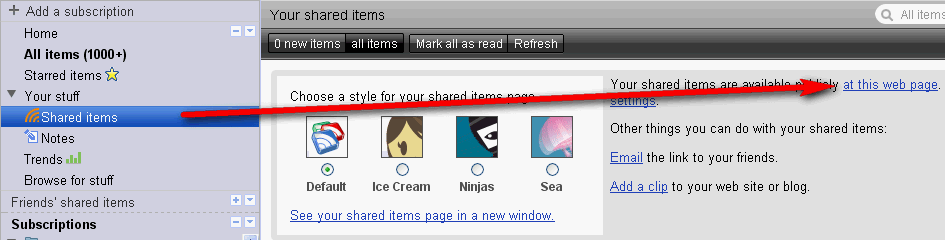
2. Go to Google Reader and expand "All Items", then click on "Shared Items" and you will see your shared items feed under "Your shared items are available publicly at this web page":
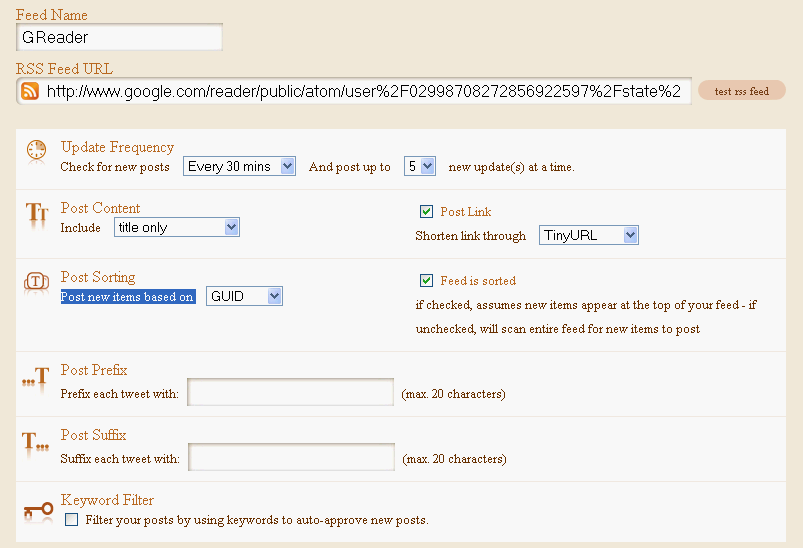
3. Sign in to TwitterFeed, click "Create new feed" to add a new feed to be published to your Twitter stream. Firstly, click: "Connect your feed to your Twitter Account", then copy the RSS feed from Google Reader (step 2) into the "RSS Feed URL" field and enter the rest of the advanced options as you wish, except "Post new items based on" which needs to be set on "GUID", like so:
That's it. Now whenever you click on the "Share" button in Google Reader, those posts will be displayed in your Twitter stream (with a delay, according to your TwitterFeed settings).