
Opera Mini 5 Beta launched
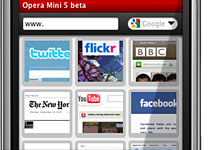
For the ones of you that know how Opera Mini works, Opera Mini 5 Beta is a major improvment. The software interface was completly redesigned, tabed browsing was added, also, if you're using Opera Desktop too, you're probably familiar with the concept of speed dial on start page. This last feature was added on Opera Mini 5 too.
Also, now it has a Password Manager to remind you your passwords . It still does not support any kind of Flash content(and probably will never do) and, since it's a Beta release, it still has some bugs. Also, for unknown reasons, the download does not work through Opera Mini 5 as it used to on Opera Mini 4.2. The default browser is opened instead to download the file. But definitely worths a look.
Update: Here's a video with Opera Mini 5 Beta in action:
To download it, set your mobile phone's browser to http://m.opera.com/next or go to http://www.opera.com/mini/next/ using your desktop browser.
 |  |
Also, now it has a Password Manager to remind you your passwords . It still does not support any kind of Flash content(and probably will never do) and, since it's a Beta release, it still has some bugs. Also, for unknown reasons, the download does not work through Opera Mini 5 as it used to on Opera Mini 4.2. The default browser is opened instead to download the file. But definitely worths a look.
Update: Here's a video with Opera Mini 5 Beta in action:
To download it, set your mobile phone's browser to http://m.opera.com/next or go to http://www.opera.com/mini/next/ using your desktop browser.


